
22 min read by CloudMash
Inside llama.cpp: What Happens Between Pressing Enter and the First Word
One prompt, one RTX 5090 and one 16.5 GB Qwen3.8-27B file, followed through every part of llama.cpp, with the real C++ source and the real numbers.
You type a question. You press Enter. A moment later, the answer starts to stream.
Behind that moment, llama.cpp walks a 27 billion parameter model through your graphics card, layer by layer, and reads about 16 gigabytes of weights for every single token it writes. This post follows one prompt, on one real machine, through every part of llama.cpp. No hand waving: every claim points at the real source code.
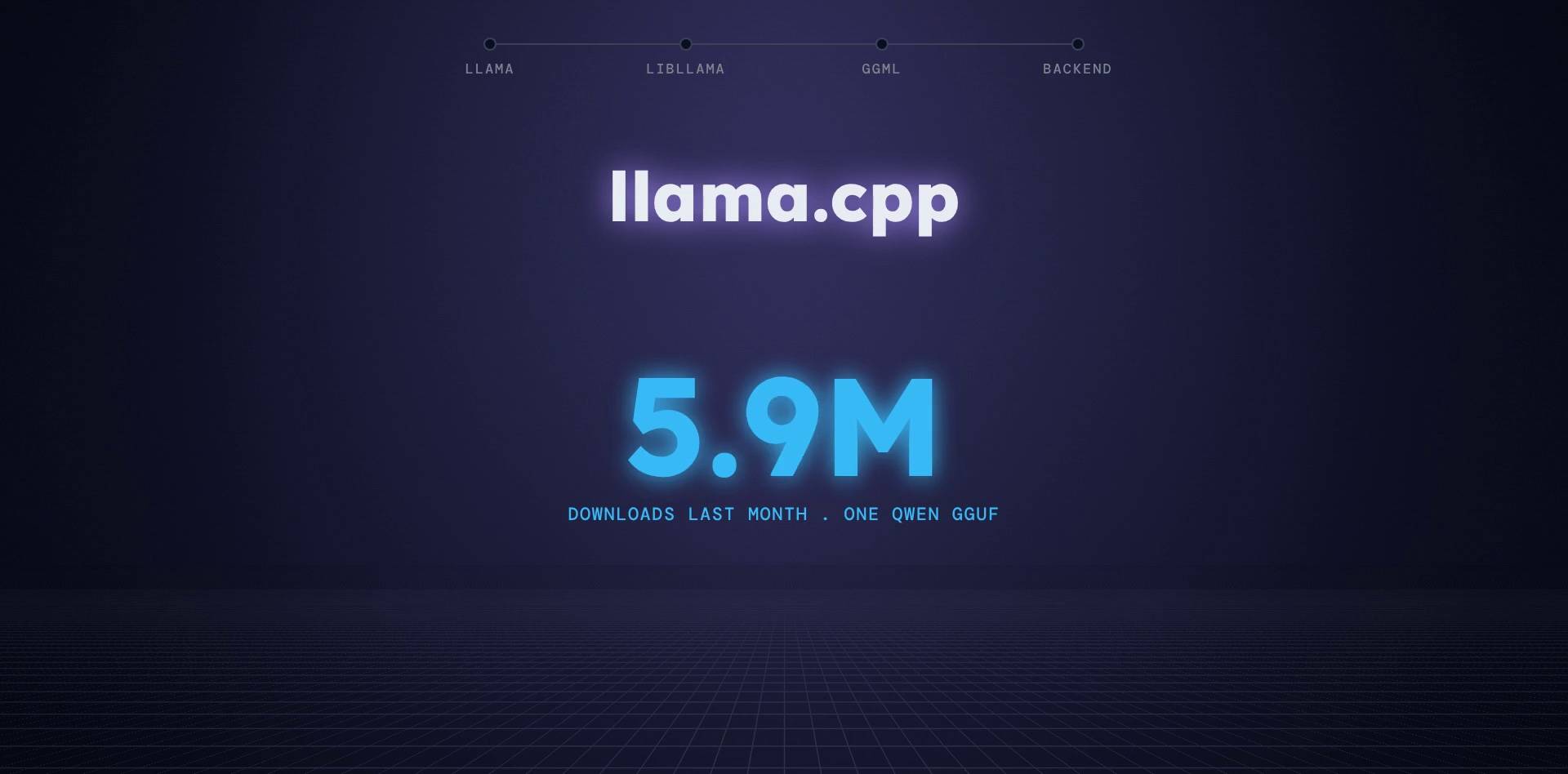
What llama.cpp is, and why it matters
llama.cpp is an open source engine, written in C and C++, that runs large language models on your own machine: a laptop, a gaming PC, a Mac, or a server.
It is everywhere right now:
- over 130 thousand stars on GitHub and more than 2,000 contributors
- it is the engine inside Ollama, LM Studio, Jan and GPT4All
- it runs on 17 kinds of hardware backends, from NVIDIA and AMD GPUs to Apple chips and plain CPUs
- the GGUF file format it created is how local models are shared; one GGUF upload of Qwen3.8-27B alone was downloaded almost 6 million times last month
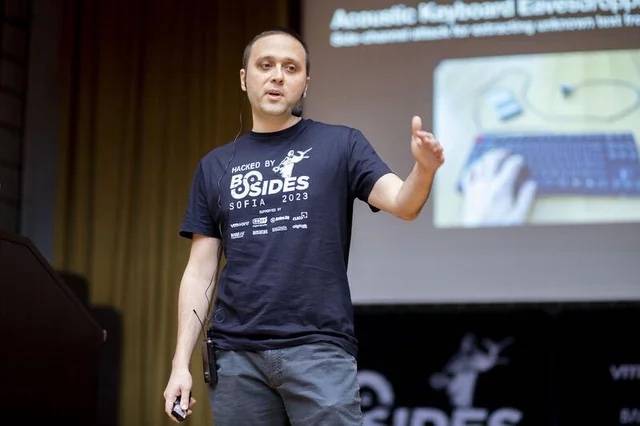
It was written by Georgi Gerganov, a physicist from Sofia, Bulgaria, in March 2023. The famous story is that he wrote it in one evening. His own answer: "Yeah, it's basically kind of true... But again, it's a combination of factors, and good timing, and some luck." He already had his tensor library, ggml, and reused his earlier code. In February 2026 his company, ggml.ai, joined Hugging Face, and the project stays MIT licensed and community driven.
The setup we will follow
- Model: Qwen3.8-27B (Alibaba, August 2026), one of the most downloaded local models right now, in the unsloth UD-Q4_K_M quantization: one GGUF file of 16.5 GB
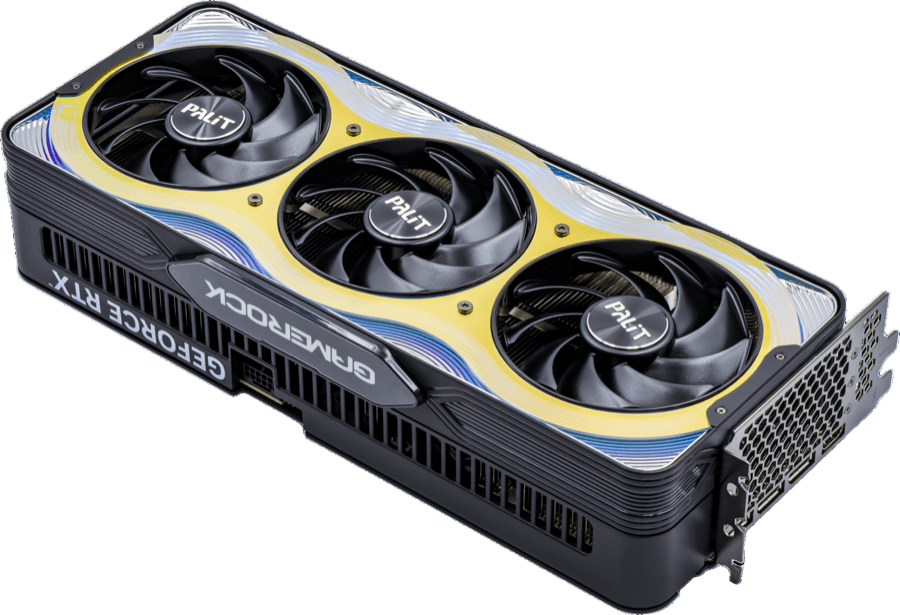
- GPU: NVIDIA RTX 5090, 32 GB of GDDR7, about 1.8 TB/s of memory bandwidth (Speed of data transfer between GPU and its RAM often called VRAM)
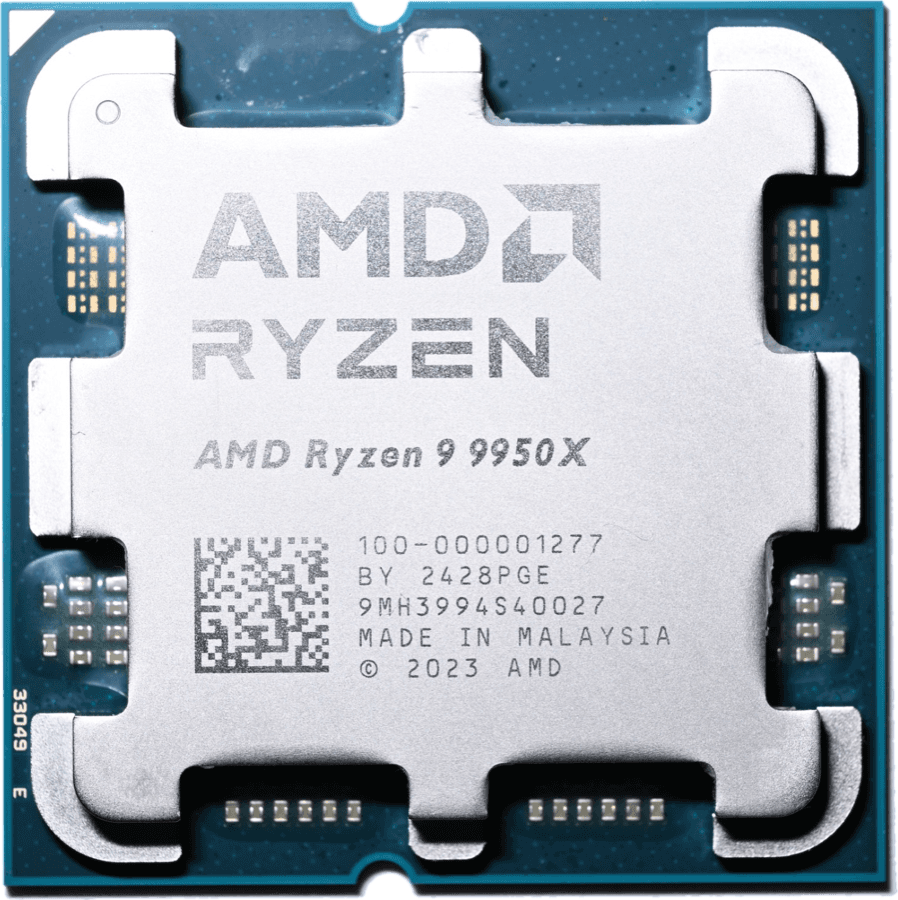
- CPU: AMD Ryzen 9 9950X, 16 cores, 32 threads, AVX-512
- RAM: 64 GB of DDR5-6000, two channels, about 96 GB/s (nineteen times slower than the GPU's memory)
- Bus: PCIe 5.0 x16, about 63 GB/s in each direction (data transfer between GPU RAM and CPU RAM)
- Command:
llama cli -m Qwen3.8-27B-UD-Q4_K_M.gguf -ngl 99 -c 32768 - Prompt: "Why is the sky blue?"




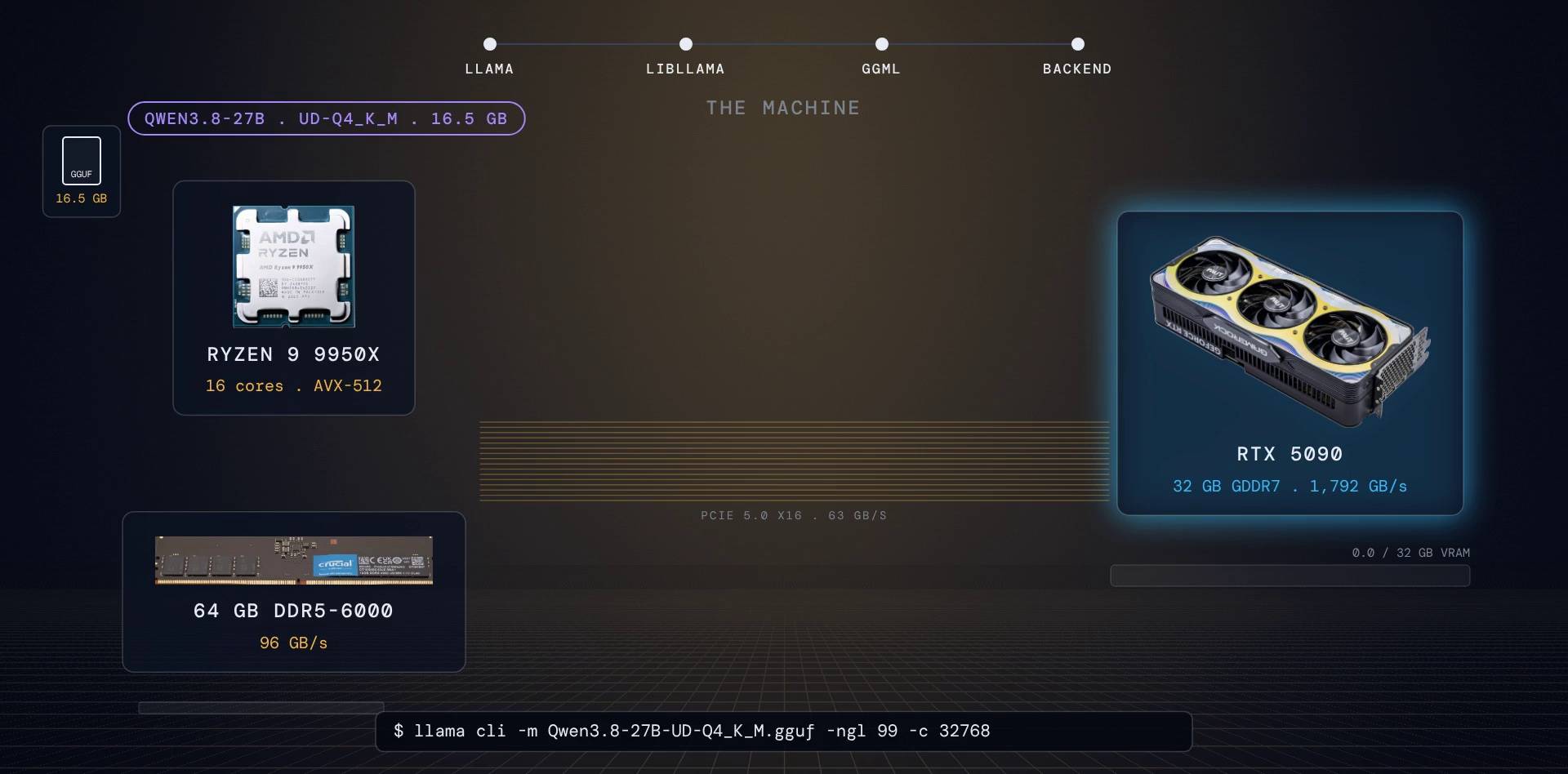
The question for the whole post: where exactly do those qwen3.8 16 gigabytes weights go, and what does every piece of llama.cpp do with them?
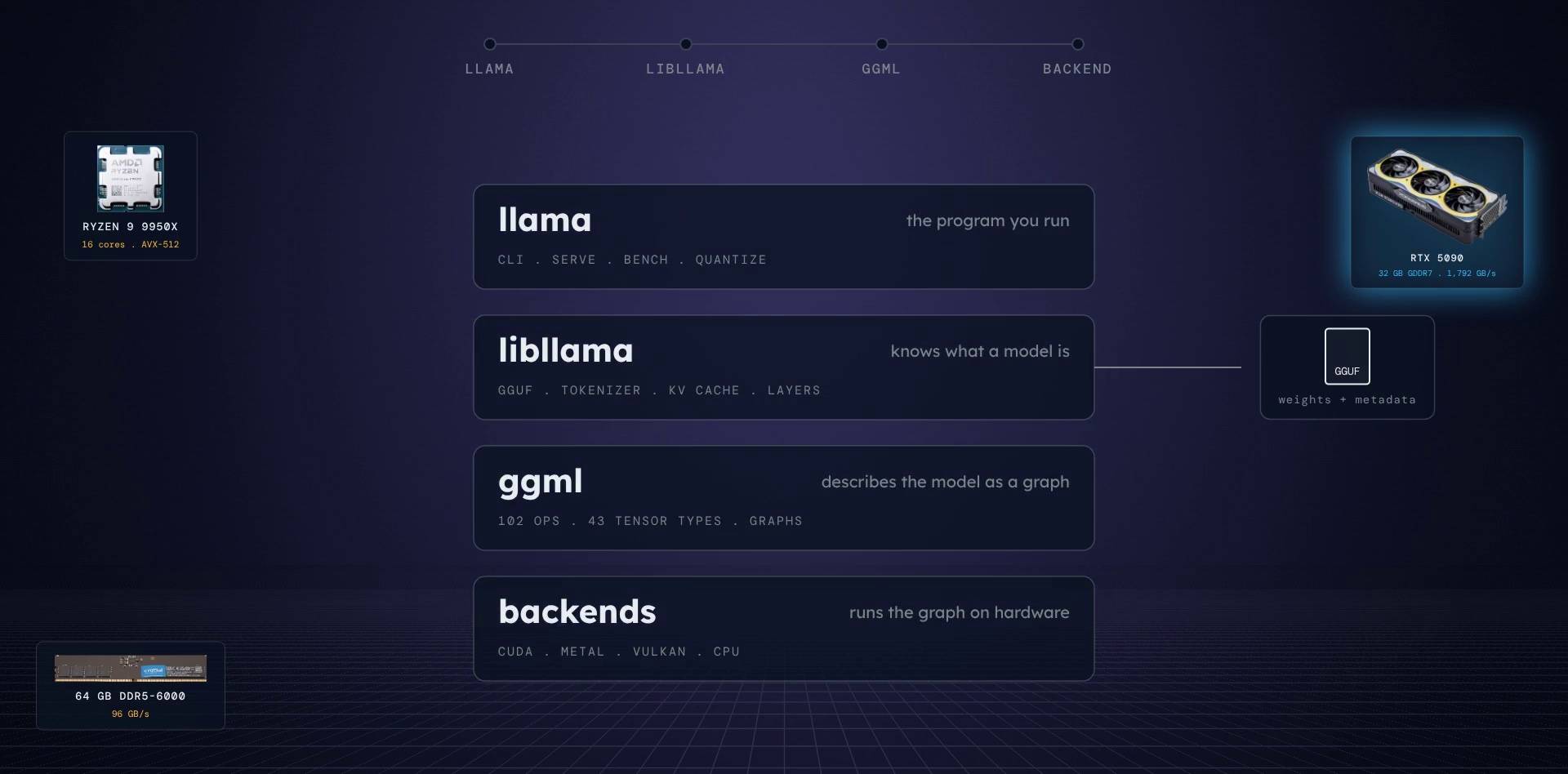
The map: four layers, top to bottom
- llama, the program you run. Today it is one binary with subcommands:
llama cli,llama serve,llama bench,llama quantizeand more. - libllama, the library. It knows what a model is: the file format, the tokenizer, the KV cache, the layers.
- ggml, a tensor library written in C. libllama uses it to describe the whole model as a graph of math operations.
- backends: CUDA for NVIDIA, Metal for Apple, Vulkan, the CPU and more. They run that graph, and they are the only code that touches hardware.
On the side sits the GGUF file: one file, all the weights, all the metadata.
We go top down, from the command you type all the way to the GPU. At the end we open up libllama and ggml themselves and look at the C++ inside.
Step 1: the program you run is a web server in disguise
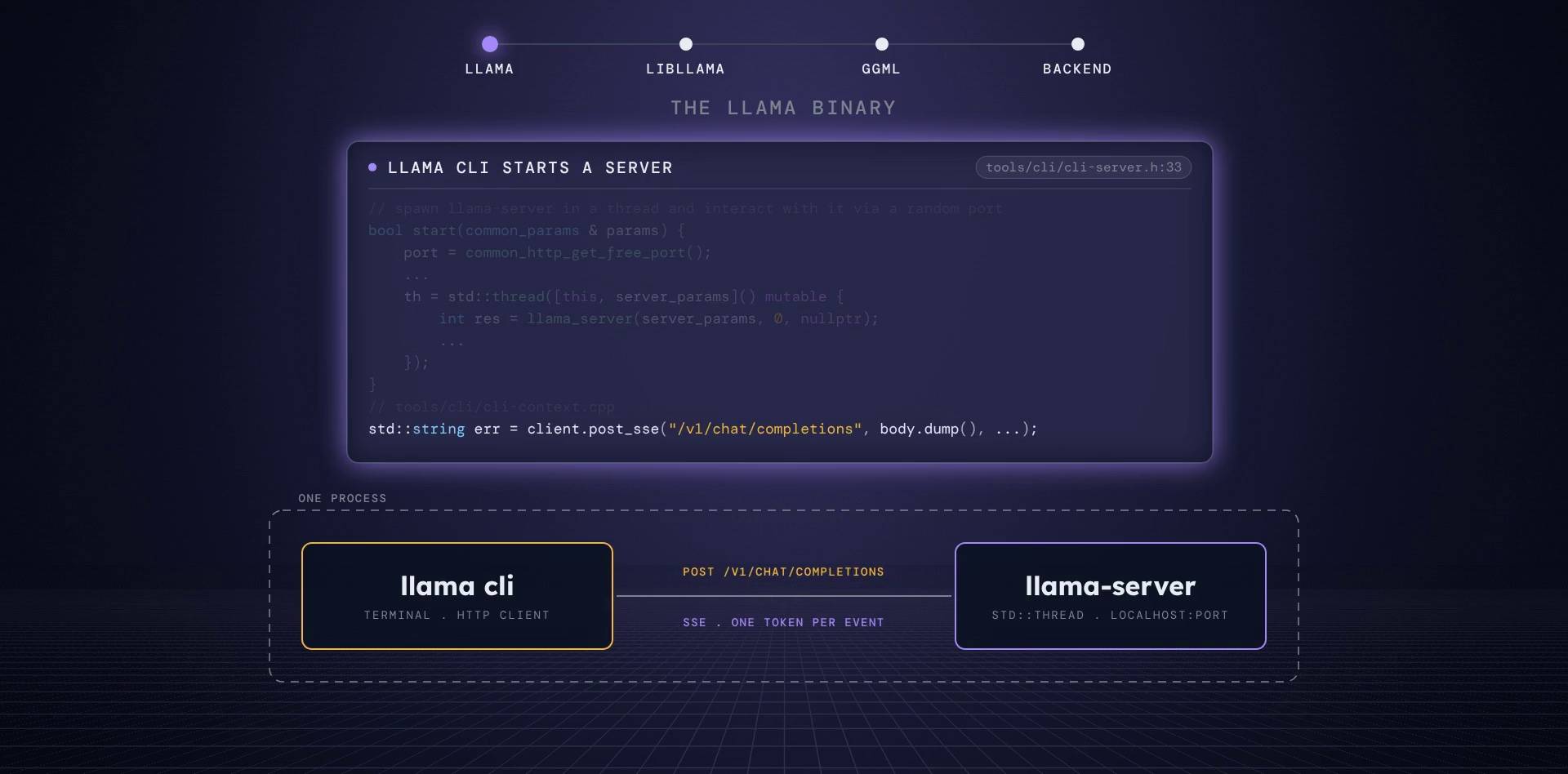
This one is a surprise. llama cli is no longer a loop that calls the library. It starts llama-server inside its own process, in a std::thread, on a random free port on localhost.
So the terminal you are typing in is actually an HTTP client. Your prompt goes out as a POST to /v1/chat/completions, and the answer streams back as server sent events (SSE), one token per event.
tools/cli/cli-server.h:33 + tools/cli/cli-context.cpp:365
// spawn llama-server in a thread and interact with it via a random port
bool start(common_params & params) {
    port = common_http_get_free_port();
    // ...
    th = std::thread([this, server_params]() mutable {
        // argc / argv are only used in router mode, we can skip them for now
        int res = llama_server(server_params, 0, nullptr);
        // ...
    });
    // ...
}

// [tools/cli/cli-context.cpp:365]
std::string err = client.post_sse("/v1/chat/completions", body.dump(), should_stop, [&](const std::string & payload) {
    // ...
Why it matters: the terminal and the web server now run the exact same code path, so everything below applies to both.
Go deeperthe old loop and the one binary
The old single-process loop still exists as llama-completion (tools/completion/completion.cpp). The new top-level app/ directory builds one llama binary whose subcommands live in a static table of {name, description, aliases, hidden, function pointer}. Each tool is built as a small static library plus a five-line main.cpp, so llama serve and llama-server share all their code.
Step 2: press Enter. Three things happen before a single weight is read
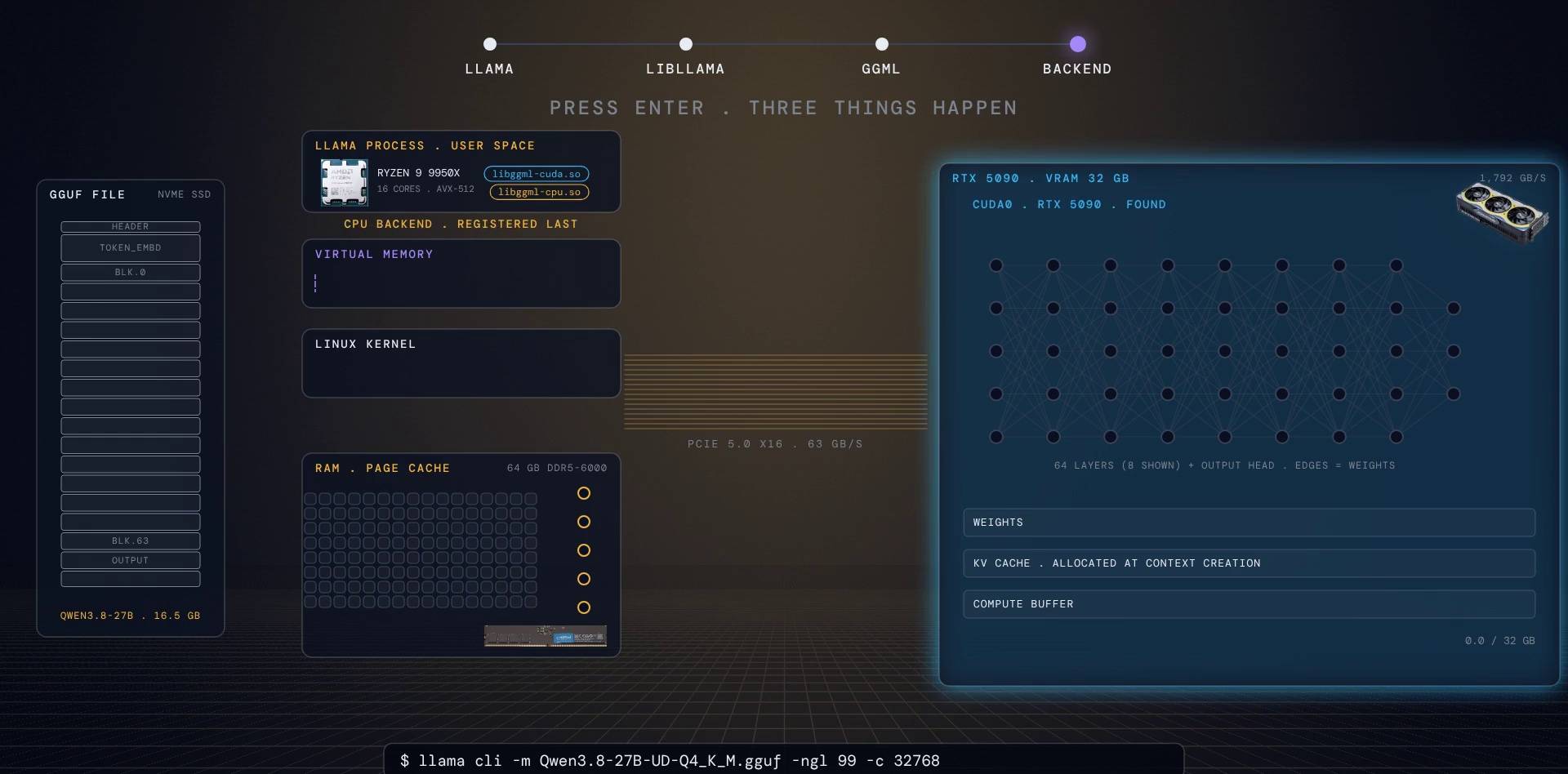
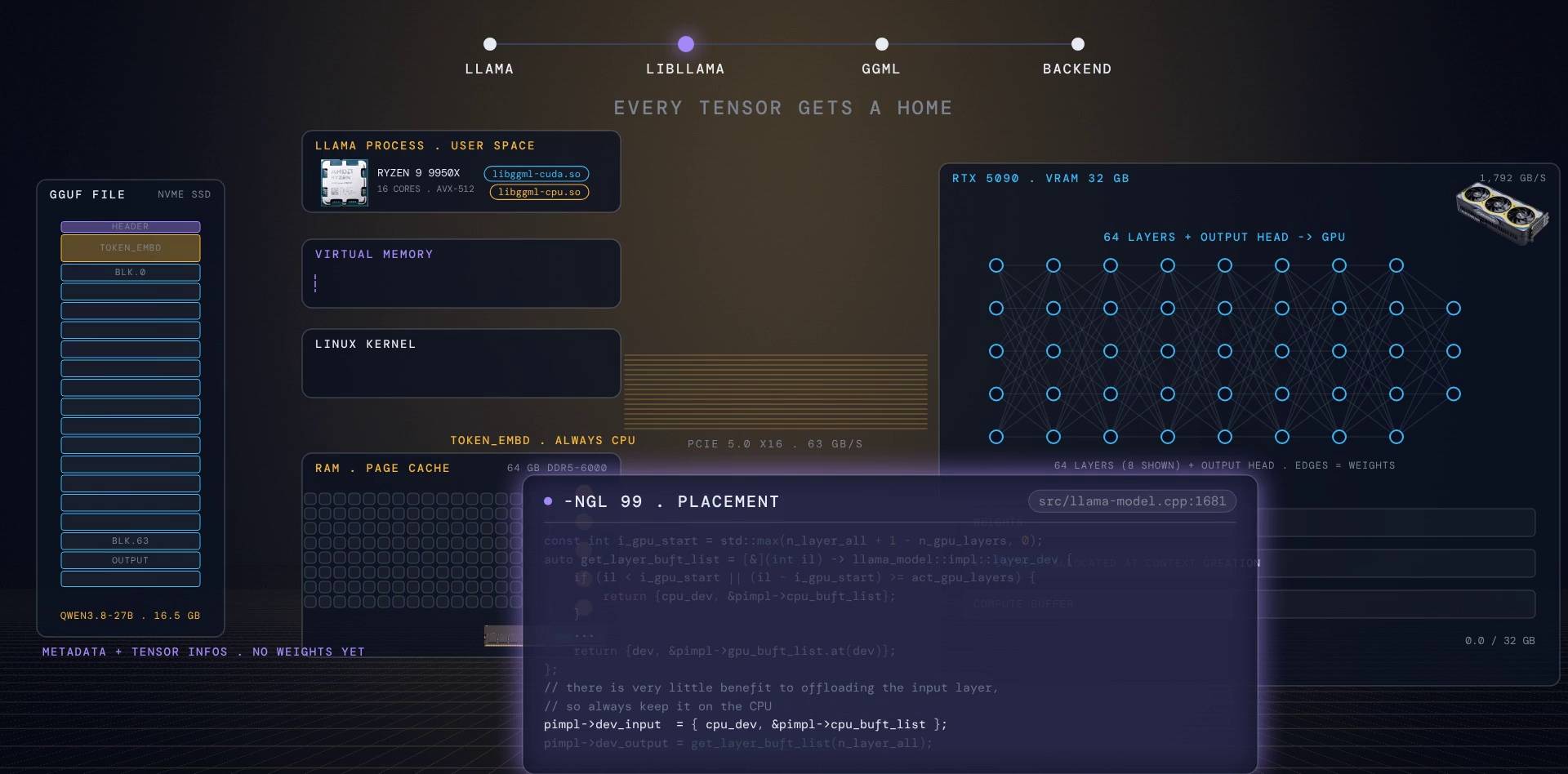
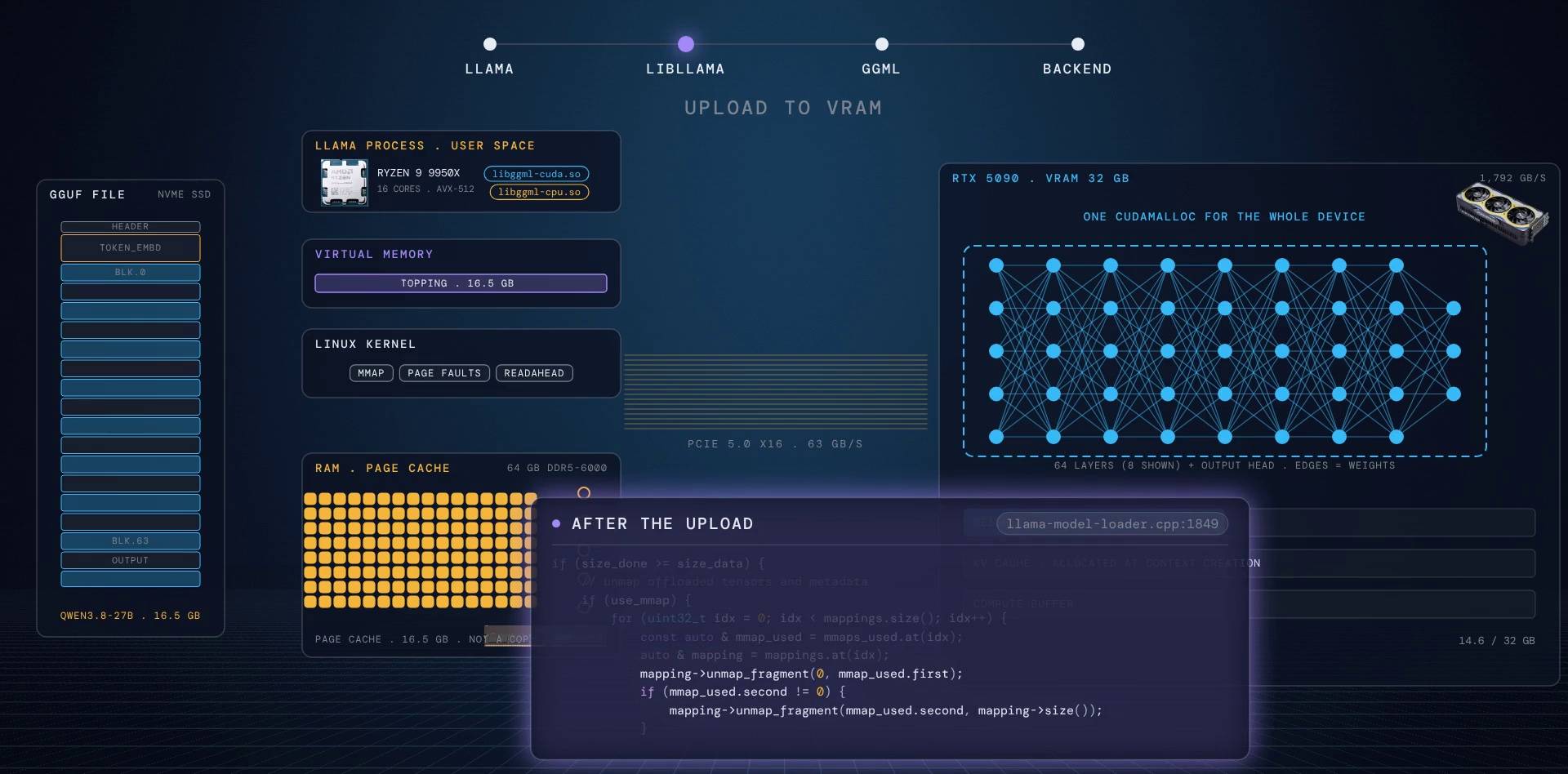
From here on, picture the machine as a stack of layers. On the left, the GGUF file on the NVMe SSD. In the middle, the host software stack: the llama process (user space), its virtual memory, the Linux kernel, and RAM, where the kernel keeps its page cache. Then the PCIe bus. On the right, the GPU and its 32 GB of VRAM, which will hold the weights, the KV cache and a compute buffer.
To make "weights" concrete, the video draws the model as a small neural network inside VRAM: 8 columns standing for the 64 layers, plus the output head. The lines between neurons are the weights. Watch where those lines come from.
One: the backends load
The CUDA backend library is picked (by a vote we will see near the end), it reports one device, CUDA0, our RTX 5090, and the CPU backend registers last. Last matters: the scheduler assumes the CPU is always the final backend.
Two: libllama reads the GGUF header
Just the header: metadata and a description of every tensor (name, shape, type, offset). No weights yet.
Three: every tensor gets a home
-ngl 99 (number of GPU layers) sends all 64 layers plus the output head to the GPU. The rule counts from the top, so -ngl 20 would put the output head plus the last 19 layers on the GPU and the rest on the CPU.
const int i_gpu_start = std::max(n_layer_all + 1 - n_gpu_layers, 0);
const int act_gpu_layers = devices.empty() ? 0 : std::min(n_gpu_layers, n_layer_all + 1);
auto get_layer_buft_list = [&](int il) -> llama_model::impl::layer_dev {
    // ...
    if (il < i_gpu_start || (il - i_gpu_start) >= act_gpu_layers) {
        // ...
        return {cpu_dev, &pimpl->cpu_buft_list};
    }
    // ...
    return {dev, &pimpl->gpu_buft_list.at(dev)};
};

// assign the input layer
// there is very little benefit to offloading the input layer, so always keep it on the CPU
pimpl->dev_input = { cpu_dev, &pimpl->cpu_buft_list };
// ...
// assign the output layer
pimpl->dev_output = get_layer_buft_list(n_layer_all);
Except one tensor. The token embedding table (token_embd) always stays in system memory. The comment in the source says it plainly: there is very little benefit to offloading the input layer. In the network picture, that is the amber embedding column that stays on the CPU side. We will see what it costs later.
Go deeperauto-fit, multi-GPU, -ot and fallbacks
- If you do not pass
-nglat all, llama.cpp now defaults to "auto":common/fit.cppmeasures free VRAM and choosesn_gpu_layers, a tensor split and per-tensor overrides for you. An explicit-ngl 99turns that fitting off. - With several GPUs,
--tensor-splitdefaults to splitting layers by each card's free memory at that moment.--split-mode rowslices single matrices across GPUs instead of whole layers. -ot(override tensor) takes a regex.--cpu-moeis literally the regex\.ffn_(up|down|gate|gate_up)_(ch|)expsmapped to the CPU buffer, which keeps a mixture-of-experts model's expert weights in RAM.- How does llama.cpp know a GPU can handle a tensor type? It builds a throwaway one-node graph with a zero-size dummy buffer and asks the backend
supports_op. If not, the tensor silently falls back to the CPU.
Step 3: the bytes. llama.cpp does not read the file, it memory maps it
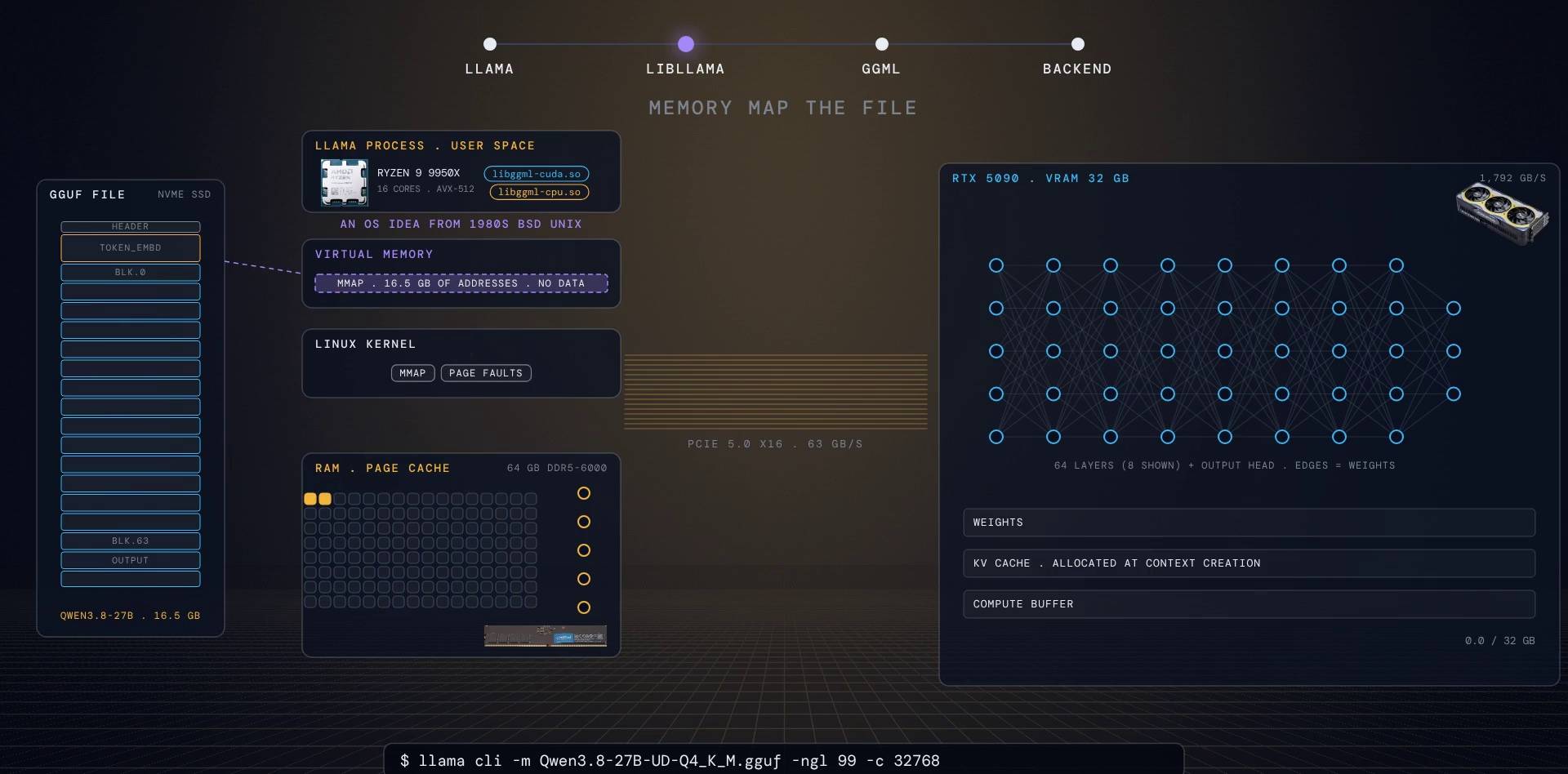
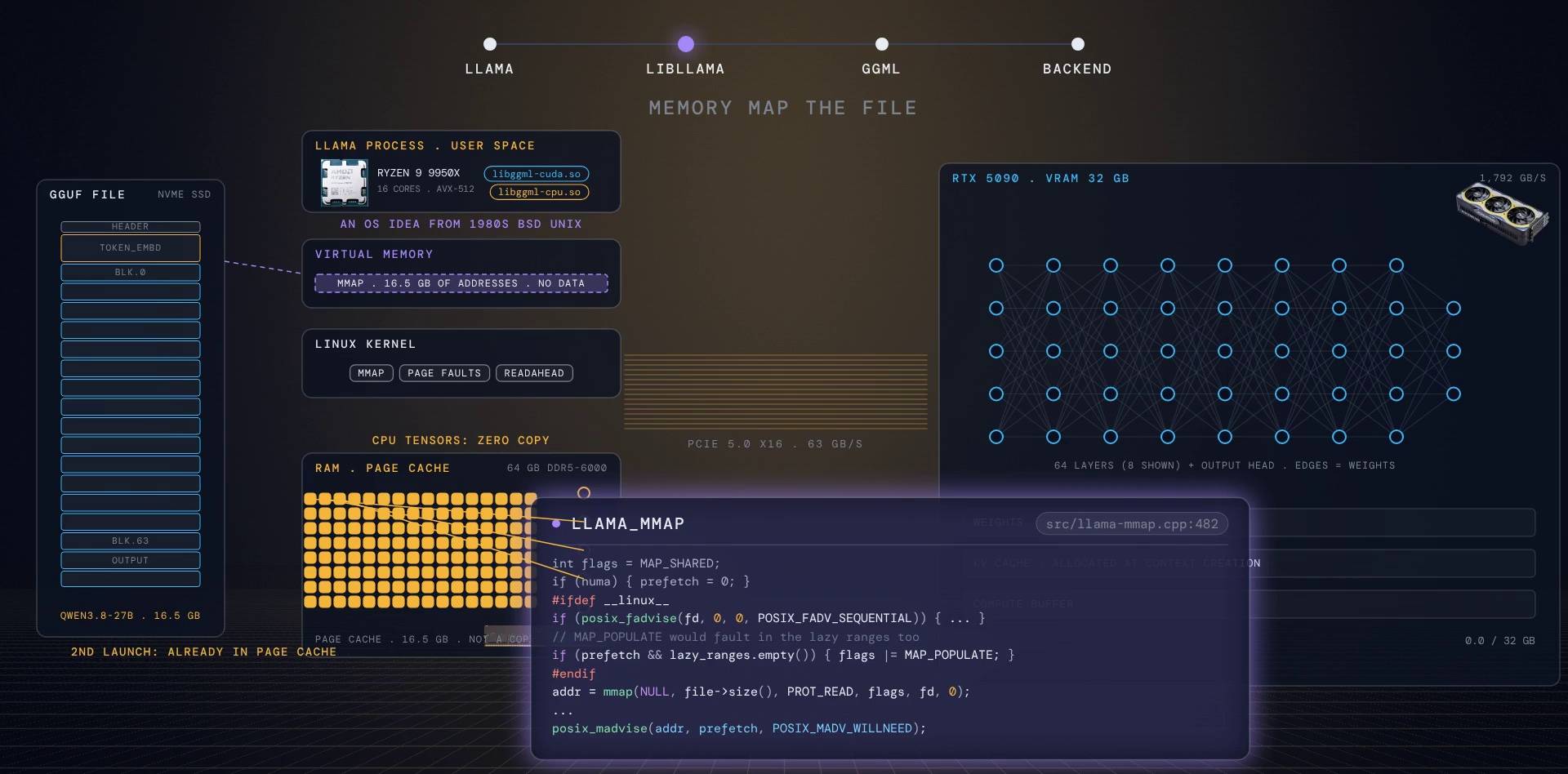
mmap is an operating system idea from 1980s BSD Unix. You ask the kernel to make a file appear as a range of addresses in your process. No copy. The data is pulled from disk into the kernel's page cache the first time you touch each page (a "page fault").
llama.cpp maps the whole 16.5 GB file and then asks for all of it up front, with MAP_POPULATE and madvise(WILLNEED). The kernel starts streaming the entire file from the SSD immediately, in order, which is the fastest way to read an SSD.
int flags = MAP_SHARED;
if (numa) { prefetch = 0; }
#ifdef __linux__
if (posix_fadvise(fd, 0, 0, POSIX_FADV_SEQUENTIAL)) {
    // ...
}
// MAP_POPULATE would fault in the lazy ranges too
if (prefetch && lazy_ranges.empty()) { flags |= MAP_POPULATE; }
#endif
addr = mmap(NULL, file->size(), PROT_READ, flags, fd, 0);
// ...
if (prefetch > 0) {
    for (const auto & range : ranges_complement(lazy_ranges, std::min(file->size(), prefetch))) {
        advise(range.first, range.second, POSIX_MADV_WILLNEED, "POSIX_MADV_WILLNEED");
    }
}
Two nice consequences:
- Zero copy on the CPU side. Any tensor that lives on the CPU (our embedding table) is used straight out of the mapping. Its "memory" is the page cache itself.
- Fast second launch. The next time you run the model, the file is already in the page cache, so it loads much faster.
Go deepershared, read-only, mlock
The mapping is MAP_SHARED with PROT_READ. Because it is read-only, shared and private mappings behave the same for page sharing, and two llama.cpp processes on the same file share one copy in RAM. With --load-mode mlock, the used range is locked into RAM so it can never be swapped out.
Step 4: the upload to VRAM
For every tensor that belongs to the GPU, the loader takes a pointer straight into the mapping and calls ggml_backend_tensor_set. In the CUDA backend that becomes one cudaMemcpy host-to-device per tensor. In the video you can watch the weights fly from the page cache across PCIe into each layer column, and the weight lines of the network light up one layer at a time.
At PCIe 5.0 speed, 16 GB would take about a quarter of a second in theory. On a cold start the SSD is the real limit.
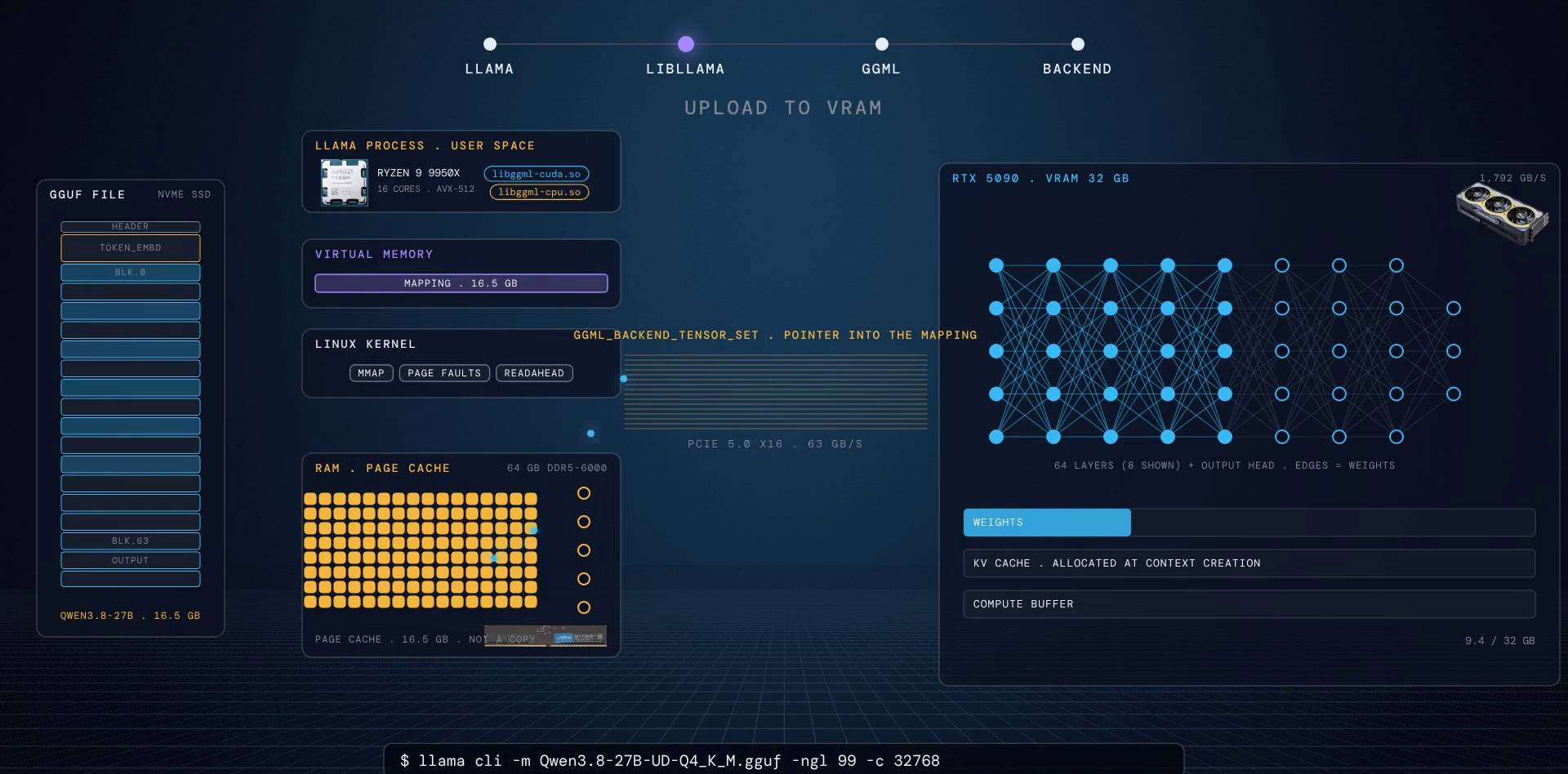
The GPU side is not thousands of small allocations. The loader groups all tensors of one device into a single buffer and does one cudaMalloc for the whole thing.
And a detail almost nobody knows: when the upload finishes, the loader unmaps the parts of the file that only the GPU needed. Your process memory drops to just the embedding table. The page cache may still hold the whole file, but the mapping is gone.
src/llama-model-loader.cpp:1849
if (size_done >= size_data) {
    // unmap offloaded tensors and metadata
    if (use_mmap) {
        for (uint32_t idx = 0; idx < mappings.size(); idx++) {
            const auto & mmap_used = mmaps_used.at(idx);
            auto & mapping = mappings.at(idx);
            mapping->unmap_fragment(0, mmap_used.first);
            if (mmap_used.second != 0) {
                mapping->unmap_fragment(mmap_used.second, mapping->size());
            }
        }
    }
    // ...
Go deeperloading without mmap
With --load-mode none (no mmap), the loader switches to an asynchronous pipeline: four 1 MiB pinned host buffers, read into one, cudaMemcpyAsync from it, and an event to know when it can be reused. It also uploads the biggest tensors first so the staging peak happens early.
Step 5: why 27 billion weights fit in 16.5 GB (quantization)
A 27B model in 16-bit floats would be 54 GB. Ours is 16.5 GB because the weights are stored as Q4_K.
The unit is a super-block of 256 weights:
| Part | What it holds | Bytes |
|---|---|---|
qs | 256 weights as 4-bit integers ("nibbles") | 128 |
scales | 8 groups of 32 weights, each with its own 6-bit scale and 6-bit minimum | 12 |
d, dmin | one 16-bit scale and one 16-bit minimum for the whole block | 4 |
| total | 144 |
144 bytes for 256 weights is 4.5 bits per weight. If every weight were Q4_K, 27 billion weights x 4.5 bits / 8 would be about 15.2 GB. The real file is 16.5 GB; the next section explains the difference.
Each weight is rebuilt as x = d * scale[j] * q - dmin * min[j]: a small integer, scaled by its group, scaled again by its block.
// 4-bit quantization
// 8 blocks of 32 elements each
// weight is represented as x = a * q + b
// Effectively 4.5 bits per weight
typedef struct {
    GGML_EXTENSION union {
        struct {
            ggml_half d;    // super-block scale for quantized scales
            ggml_half dmin; // super-block scale for quantized mins
        } GGML_COMMON_AGGR_S;
        ggml_half2 dm;
    } GGML_COMMON_AGGR_U;
    uint8_t scales[K_SCALE_SIZE]; // scales and mins, quantized with 6 bits
    uint8_t qs[QK_K/2];           // 4--bit quants
} block_q4_K;
static_assert(sizeof(block_q4_K) == 2*sizeof(ggml_half) + K_SCALE_SIZE + QK_K/2, "wrong q4_K block size/padding");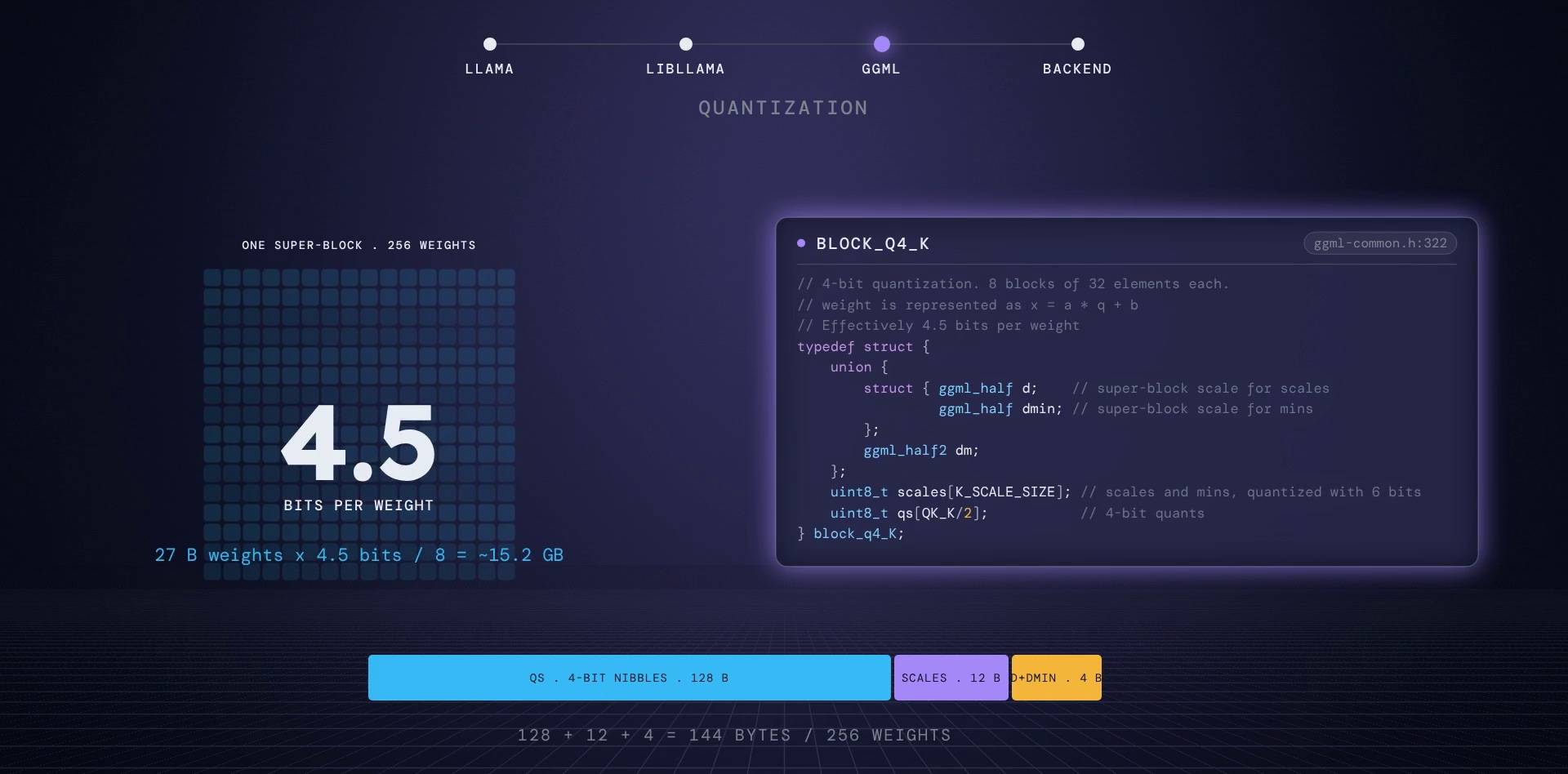
// calculator
How big is the file?
Parameters times bits per weight, divided by 8 bits per byte.
27 B x 4.5 bits / 8
The real file mixes nine tensor types and averages 4.82 bits per weight over 27.3 billion weights: 27.3 x 4.82 / 8 = 16.5 GB, the size on disk.
The "M" in Q4_K_M
Q4_K_M ("medium") is not uniform. llama-quantize keeps the output head at Q6_K, and gives the attention value weights and the FFN down weights Q6_K in the first eighth of the layers, the last eighth, and every third layer in between. The rule is literally three lines of code. Layers near the input and the output are the most sensitive to error, so they get more bits. Norm weights stay in 32-bit float; they are tiny.
auto use_more_bits = [](int i_layer, int n_layers) -> bool {
    return i_layer < n_layers/8 || i_layer >= 7*n_layers/8 || (i_layer - n_layers/8)%3 == 2;
};
// ...
if (category == tensor_category::OUTPUT || (qs.has_tied_embeddings && category == tensor_category::TOKEN_EMBD)) {
    // ...
        else if (new_type != GGML_TYPE_Q8_0) {
            new_type = GGML_TYPE_Q6_K;
        }
// ...
} else if (category_is_attn_v(category)) {
    // ...
    else if ((ftype == LLAMA_FTYPE_MOSTLY_Q4_K_M || ftype == LLAMA_FTYPE_MOSTLY_Q5_K_M) &&
            use_more_bits(qs.i_attention_wv, qs.n_attention_wv)) new_type = GGML_TYPE_Q6_K;
// ...
} else if (category == tensor_category::FFN_DOWN) {
    // ...
    else if (ftype == LLAMA_FTYPE_MOSTLY_Q4_K_M) {
        // ...
            if (use_more_bits(i_layer, n_layer)) new_type = GGML_TYPE_Q6_K;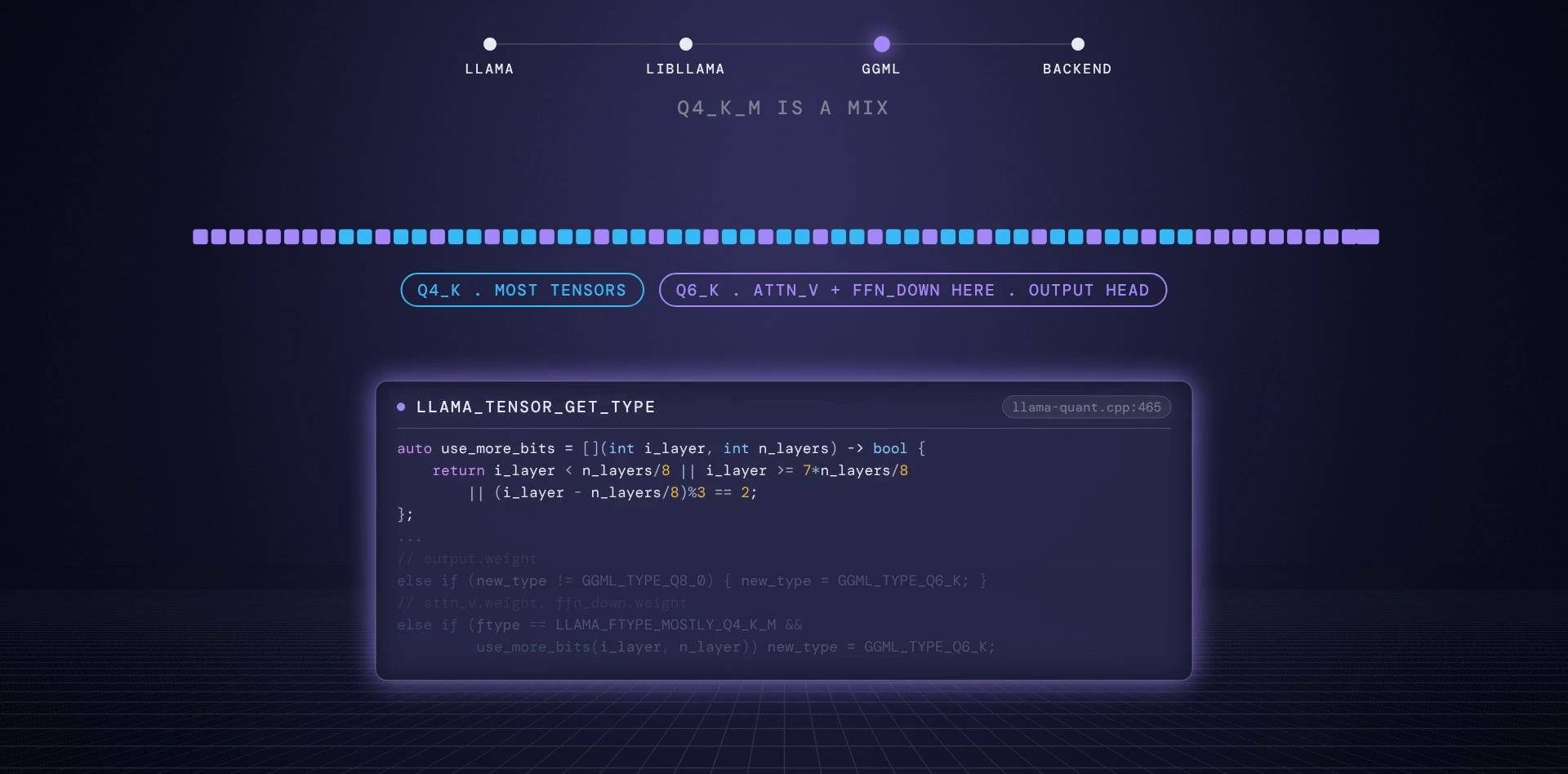
The file in this post is not a plain Q4_K_M
That rule is what llama-quantize does for a standard Q4_K_M. The file here is unsloth's UD-Q4_K_M ("Unsloth Dynamic"), which picks a type for each tensor itself. Reading the GGUF header of Qwen3.8-27B-UD-Q4_K_M.gguf shows 866 tensors in nine types:
| Type | Bits per weight | Share of the file |
|---|---|---|
| Q5_K | 5.5 | 29.4% |
| IQ4_XS | 4.25 | 28.9% |
| Q4_K | 4.5 | 25.6% |
| Q6_K | 6.56 | 11.0% |
| IQ4_NL, Q3_K, IQ3_S, Q8_0, F32 | 3.4 to 32 | about 5% together |
Across all 27.3 billion weights that averages 4.82 bits per weight: 16.45 GB of weights, which is the 16.5 GB file. The output head is Q6_K and the token embeddings Q4_K; the feed-forward weights are mostly IQ4_XS, Q5_K and Q4_K, chosen layer by layer. So "Q4_K_M" in the file name is a family label, not the format of every tensor.
Go deeperimportance matrices and CPU repacking
- With an importance matrix (
--imatrix, made byllama-imatrixfrom sample text), the quantizer weighs each weight by how strongly it is activated, so the 6-bit scale and minimum of every group are fitted to the weights that matter most. - On the CPU, Q4_K weights can be "repacked" at load time into
block_q4_Kx8, interleaving 8 rows so one SIMD kernel computes 8 outputs per pass. This needs a copy, so it is skipped when the weights come straight from mmap.
Step 6: the context, and the birth of the KV cache
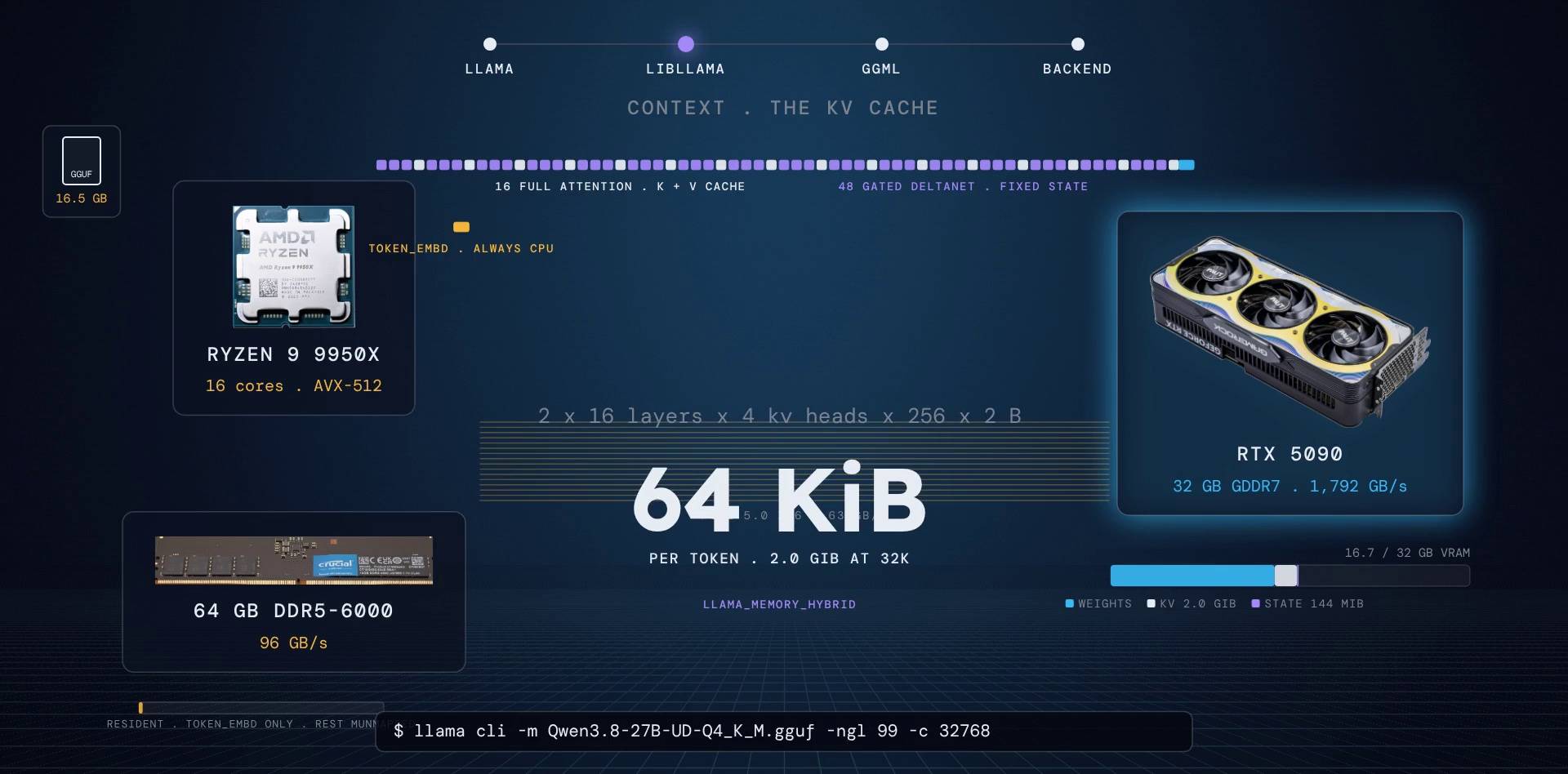
Weights are on the GPU. Now libllama creates a context, and this is where the KV cache is born. The KV cache stores, for every token already seen, the "key" and "value" vectors each attention layer computed, so they never have to be recomputed.
We asked for 32,768 tokens. The number is rounded up to a multiple of 256. Then, for every attention layer, two tensors are allocated on the same device as that layer's weights: one for keys, one for values.
Here is where Qwen3.8 gets interesting. Only 16 of its 64 layers are full attention. The other 48 are Gated DeltaNet layers, a kind of linear attention that keeps no growing cache at all, just a fixed-size state (about 144 MiB in total) updated in place every token. llama.cpp handles both kinds with one object, called hybrid memory.
So the KV cache costs:
2 (K and V) x 16 layers x 4 KV heads x 256 dims x 2 bytes = 64 KiB per token
That is 2 GiB at 32 thousand tokens, and 8 GiB at 128 thousand. If all 64 layers were attention, it would be four times more.
src/llama-kv-cache.cpp:216 + src/models/qwen35.cpp:169
if (offload) {
    auto * dev = model.dev_layer(il);
    buft = ggml_backend_dev_buffer_type(dev);
    // ...
}
// ...
ggml_tensor * k = has_k ? ggml_new_tensor_3d(ctx, type_k, n_embd_k_gqa, kv_size, n_stream) : nullptr;
ggml_tensor * v = has_v ? ggml_new_tensor_3d(ctx, type_v, n_embd_v_gqa, kv_size, n_stream) : nullptr;

// [src/models/qwen35.cpp:169]
// Determine layer type and build appropriate attention mechanism
if (hparams.is_recr(il)) {
    // Linear attention layer (gated delta net)
    cur = build_layer_attn_linear(inp->get_recr(), cur, il);
} else {
    // Full attention layer
    cur = build_layer_attn(inp->get_attn(), cur, inp_pos, sections, il);
}
// calculator
How big is the KV cache?
2 (K and V) x attention layers x KV heads x head dim x bytes per element, for every token of context.
per token at 32,768 tokens
Only Qwen3.8's 16 full-attention layers count. The 48 Gated DeltaNet layers keep a fixed state instead (about 144 MiB, whatever the context).
Three flags you have probably typed
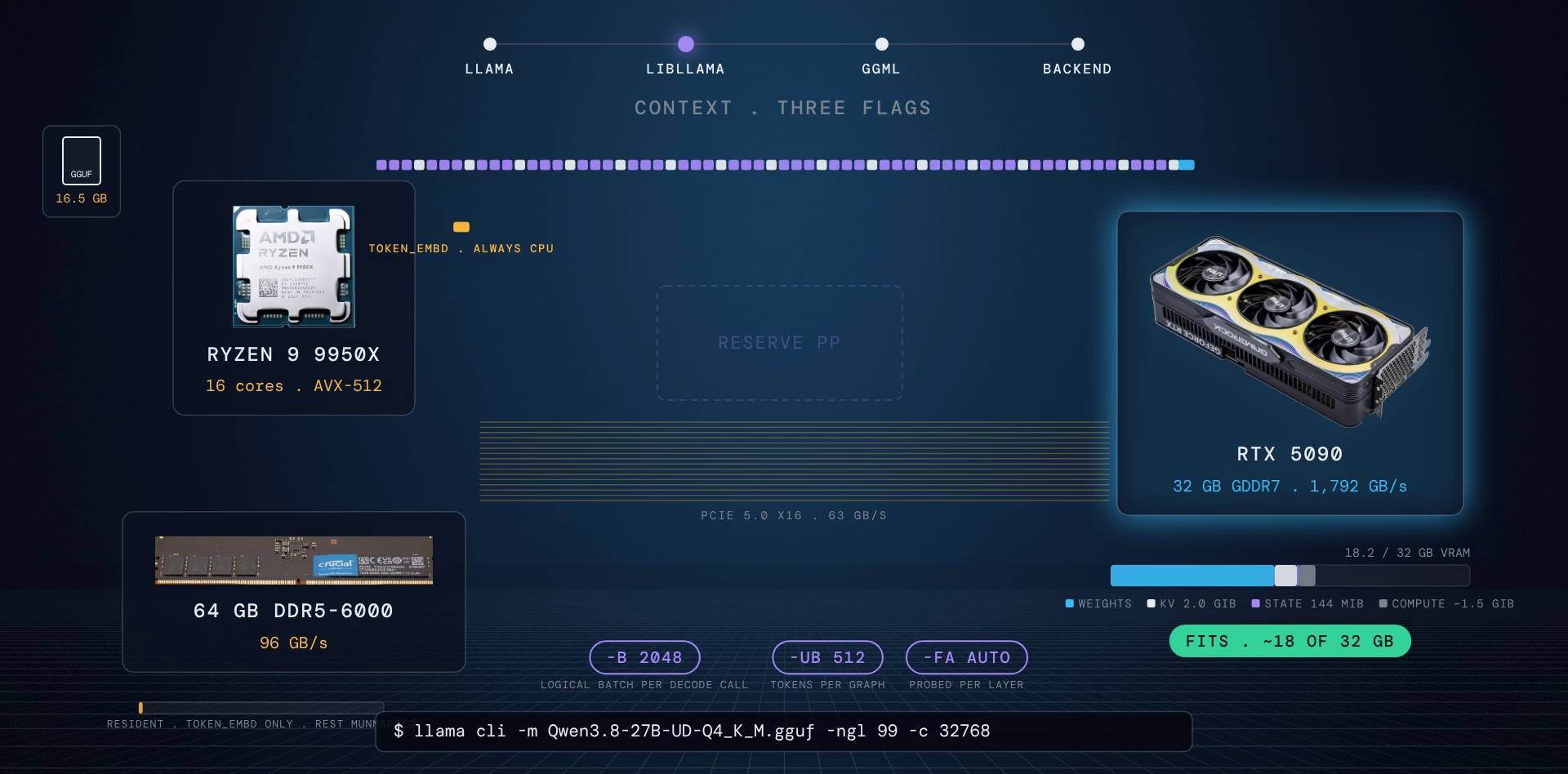
-b 2048(n_batch): the most tokens one decode call may contain.-ub 512(n_ubatch): how many tokens go through the GPU in one graph. A long prompt is cut into micro-batches of 512.-fa auto(flash attention): libllama builds a probe graph, asks the scheduler where each attention node landed, and keeps flash attention only if every layer's node is on its own device.
Then libllama builds the full graph three times with worst-case shapes (prompt, generation, prompt). Not to run it, just to measure it. The compute buffer is allocated once and decoding never allocates memory again. That promise is what makes CUDA graphs possible later.
Go deeperflash attention, quantized cache, pinned logits
- Flash attention also changes how memory is used. Without it, attention materialises a big "K times Q" matrix of size (cells x tokens x heads); with it, the kernel streams K and V in tiles and never builds that matrix. Without flash attention, the V cache is stored transposed, which is why a quantized V cache (
-ctv q8_0) requires flash attention. -ctk q8_0 -ctv q8_0halves the KV cache (about 34 KiB per token here).- The logits buffer (the model's output scores) is allocated in CUDA pinned host memory, so copying it back to the CPU is a DMA transfer.
Step 7: your prompt becomes 58 tokens
The server first renders the chat template. Qwen ships it inside the GGUF as a Jinja template, and llama.cpp now has its own Jinja engine.
And here is a hidden step: you did not write a system message, but Qwen3.8's template adds one anyway ("Reasoning effort is set to xhigh..."), and it opens a <think> tag for the answer. Your five-word question becomes 58 tokens. (We verified this with the real Qwen3.8 tokenizer and template.)
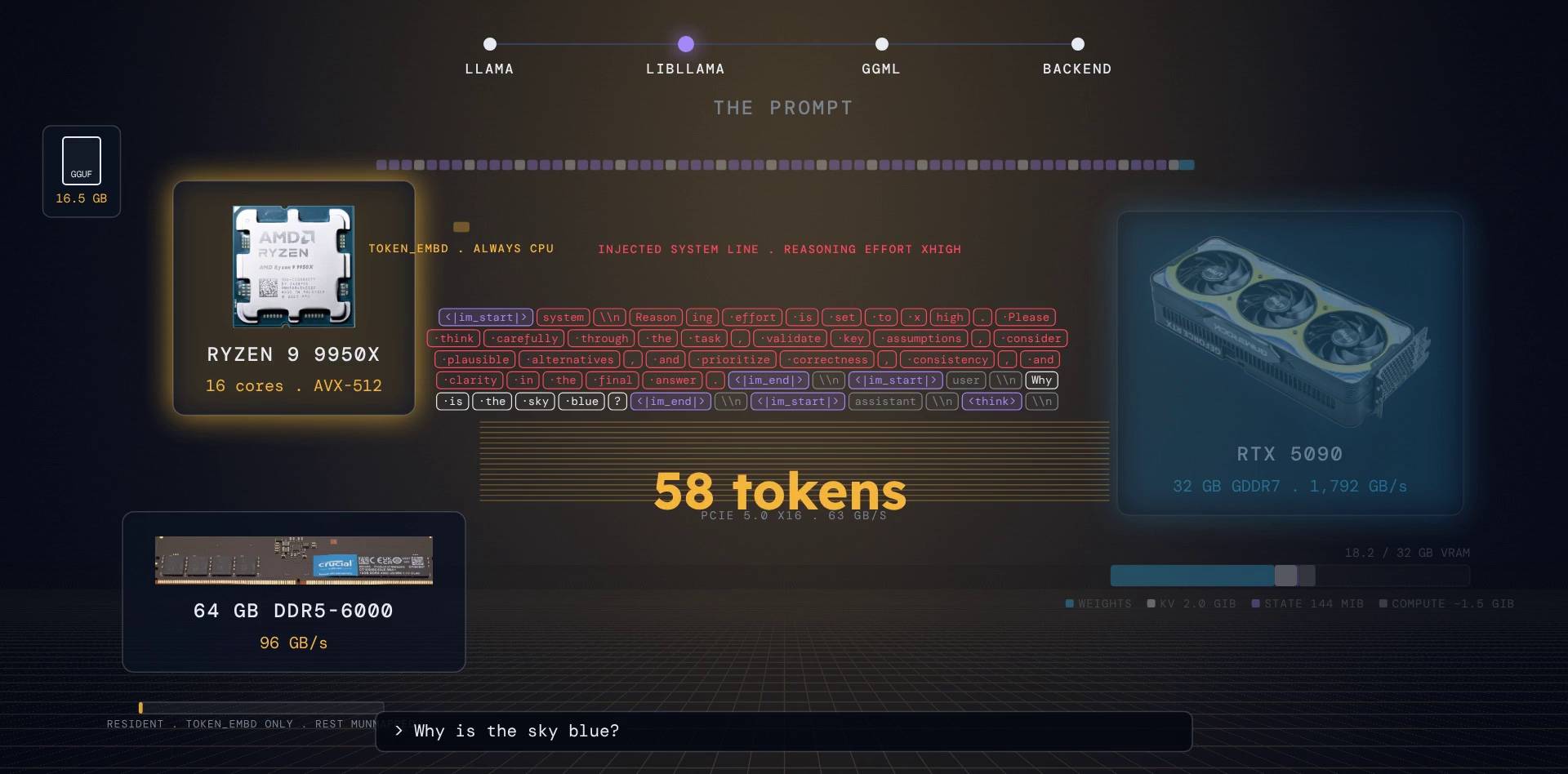
The tokenizer is byte-level BPE with a vocabulary of 248,320 tokens. Special tokens like <|im_start|> are matched first, as whole strings, so user text can never merge into a control token. A regular expression then splits the rest into words. The GGUF file names which rule to use: this one says tokenizer.ggml.pre = qwen35. llama.cpp's QWEN35 rule keeps letters together with their combining marks ([\p{L}\p{M}]+), so accented and Indic words are not cut apart. Each word is then merged bottom up by rank using a priority queue. Qwen adds no beginning-of-sequence token. The result is 58 integers in RAM.
src/llama-vocab.cpp:399 + src/llama-vocab.cpp:3775
case LLAMA_VOCAB_PRE_TYPE_QWEN35:
    regex_exprs = {
        // original regex from tokenizer.json
        // ...
        "(?:'[sS]|'[tT]|'[rR][eE]|'[vV][eE]|'[mM]|'[lL][lL]|'[dD])|[^\\r\\n\\p{L}\\p{N}]?[\\p{L}\\p{M}]+|\\p{N}| ?[^\\s\\p{L}\\p{M}\\p{N}]+[\\r\\n]*|\\s*[\\r\\n]+|\\s+(?!\\S)|\\s+",
    };
    break;

// [src/llama-vocab.cpp:3775]
if (!raw_text.empty()) {
    fragment_buffer.emplace_front(raw_text, 0, raw_text.length());
    tokenizer_st_partition(fragment_buffer, parse_special);
}
Step 8: prefill, all 58 tokens at once
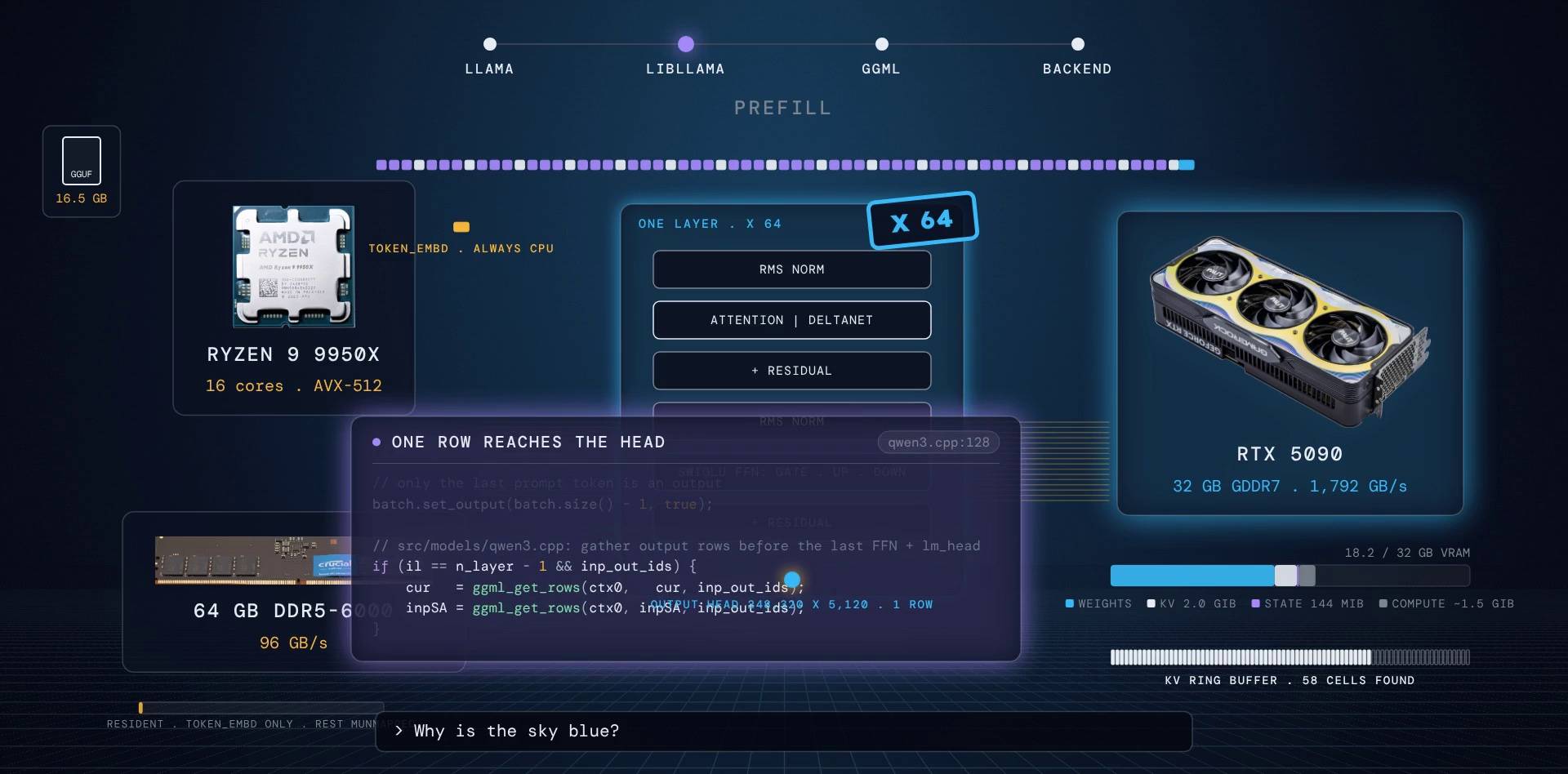
All 58 prompt tokens go through the model together, in one graph.
- The KV cache finds 58 free cells in a ring buffer and writes their indices into the graph as an input.
- libllama builds the graph: for each of the 64 layers, an RMS norm, then either the attention block or the DeltaNet block, a residual add, another norm, and the SwiGLU feed forward (gate, up, multiply, down).
- Only the last prompt token is marked as an output. At the last layer, a
get_rowsop picks that single row, so the final norm and the huge output matrix (248,320 x 5,120) run on one token, not 58.
tools/server/server-context.cpp:4440 + src/models/qwen35.cpp:178
// extract the logits only for the last token
batch.set_output(batch.size() - 1, true);

// [src/models/qwen35.cpp:178]
if (il == n_layer - 1 && crop_before_nextn(inp_out_ids)) {
    cur   = ggml_get_rows(ctx0, cur,   inp_out_ids);
    inpSA = ggml_get_rows(ctx0, inpSA, inp_out_ids);
}
Who runs which node? The scheduler
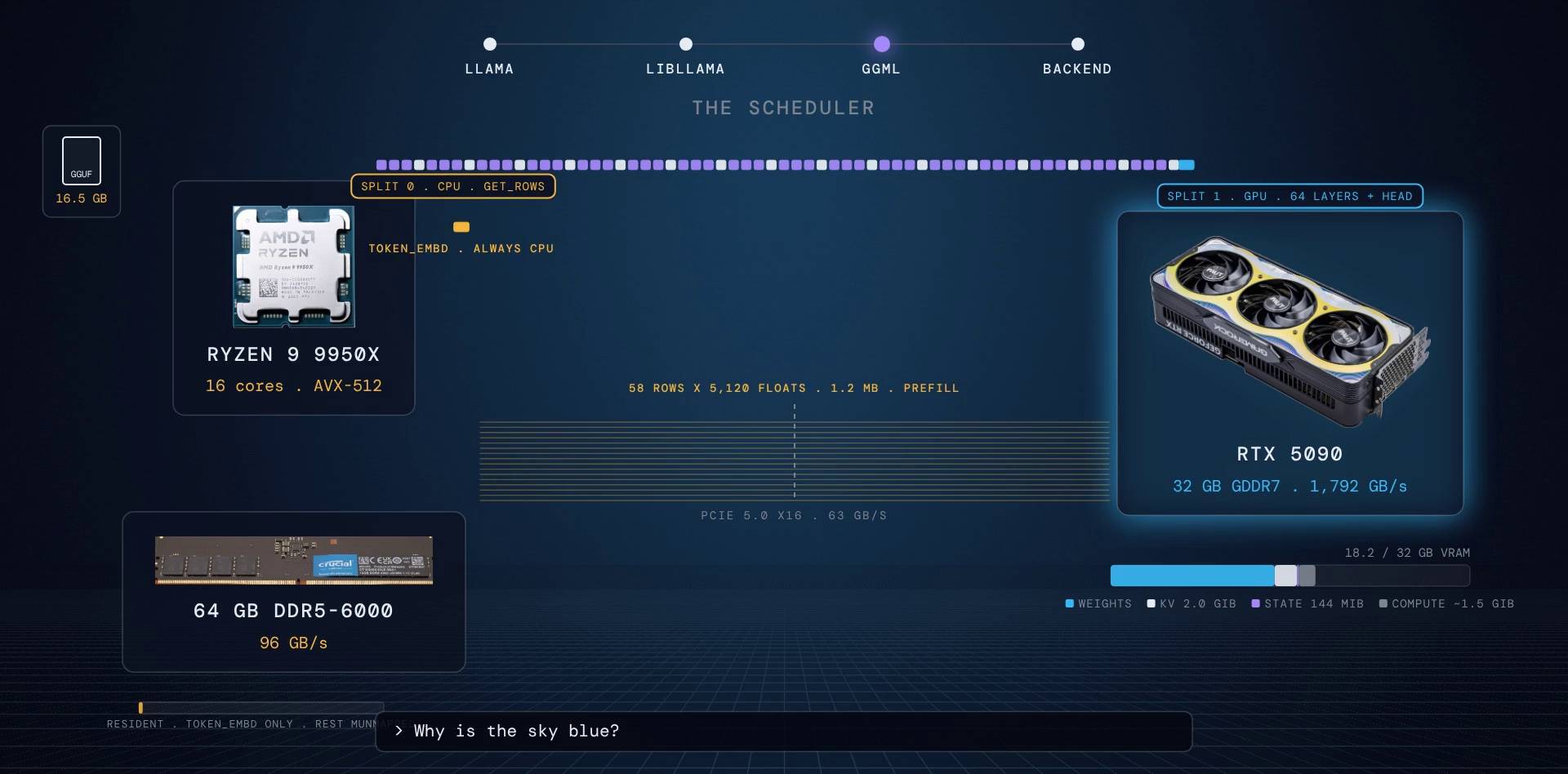
The ggml scheduler's rule fits in one sentence: run an operation where its weight lives. Every weight buffer was tagged at load time; the scheduler reads the tag, then spreads the GPU assignment to neighbouring nodes.
It then cuts the node list into "splits" wherever the backend changes. For our run there are exactly two: split 0 on the CPU (the embedding lookup, because the embedding table stayed in RAM) and split 1 on the GPU (everything else). Between them, the embedding rows cross PCIe: 58 rows x 5,120 floats, about 1.2 MB. Every decode step after this pays again: one more row, 20 KB.
ggml/src/ggml-backend.cpp:1099
// operations with weights are preferably run on the same backend as the weights
// ...
if (src->buffer != NULL && src->buffer->usage == GGML_BACKEND_BUFFER_USAGE_WEIGHTS) {
    int src_backend_id = ggml_backend_sched_backend_from_buffer(sched, src, tensor);
    // check if a backend with higher prio wants to offload the op
    if (sched->op_offload && src_backend_id == sched->n_backends - 1 && ggml_backend_buffer_is_host(src->buffer)) {
        // ...
    }
    SET_CAUSE(tensor, "1.wgt%d", i);
    return src_backend_id;
}
Inside the GPU: the part most explanations get wrong
The CUDA backend never turns the 4-bit weights back into floats. Instead:
- It quantizes the activations: every block of 32 input values gets one scale (the maximum divided by 127) and becomes 32 signed 8-bit integers (Q8_1).
- Now both sides are integers. The kernel unpacks 8 nibbles from one 32-bit word with a shift and a mask, and multiplies them against the 8-bit activations with dp4a, an instruction that does four multiply-adds at once. The 6-bit scales are applied once per group of 32, not per weight.
- For prefill (58 tokens at once) the MMQ kernel does this with int8 tensor cores and tiles in shared memory. Each weight is read once and used 58 times, which is why prefill is limited by compute.
ggml/src/ggml-cuda/quantize.cu:88 + ggml/src/ggml-cuda/vecdotq.cuh:518
amax = warp_reduce_max<QK8_1>(amax);
sum  = warp_reduce_sum<QK8_1>(sum);

const float  d = amax / 127.0f;
const int8_t q = amax == 0.0f ? 0 : roundf(xi / d);

// [ggml/src/ggml-cuda/vecdotq.cuh:518]
const int v0i = (v[0] >> (4*i)) & 0x0F0F0F0F;
const int v1i = (v[1] >> (4*i)) & 0x0F0F0F0F;

const int dot1 = ggml_cuda_dp4a(v1i, u[2*i+1], ggml_cuda_dp4a(v0i, u[2*i+0], 0)); // SIMD dot product
const int dot2 = ggml_cuda_dp4a(0x01010101, u[2*i+1], ggml_cuda_dp4a(0x01010101, u[2*i+0], 0)); // sum of u

sumf_d += d8[i] * (dot1 * sc[i]);
sumf_m += d8[i] * (dot2 * m[i]);  // multiply constant part of q4_K with sum of q8_1 values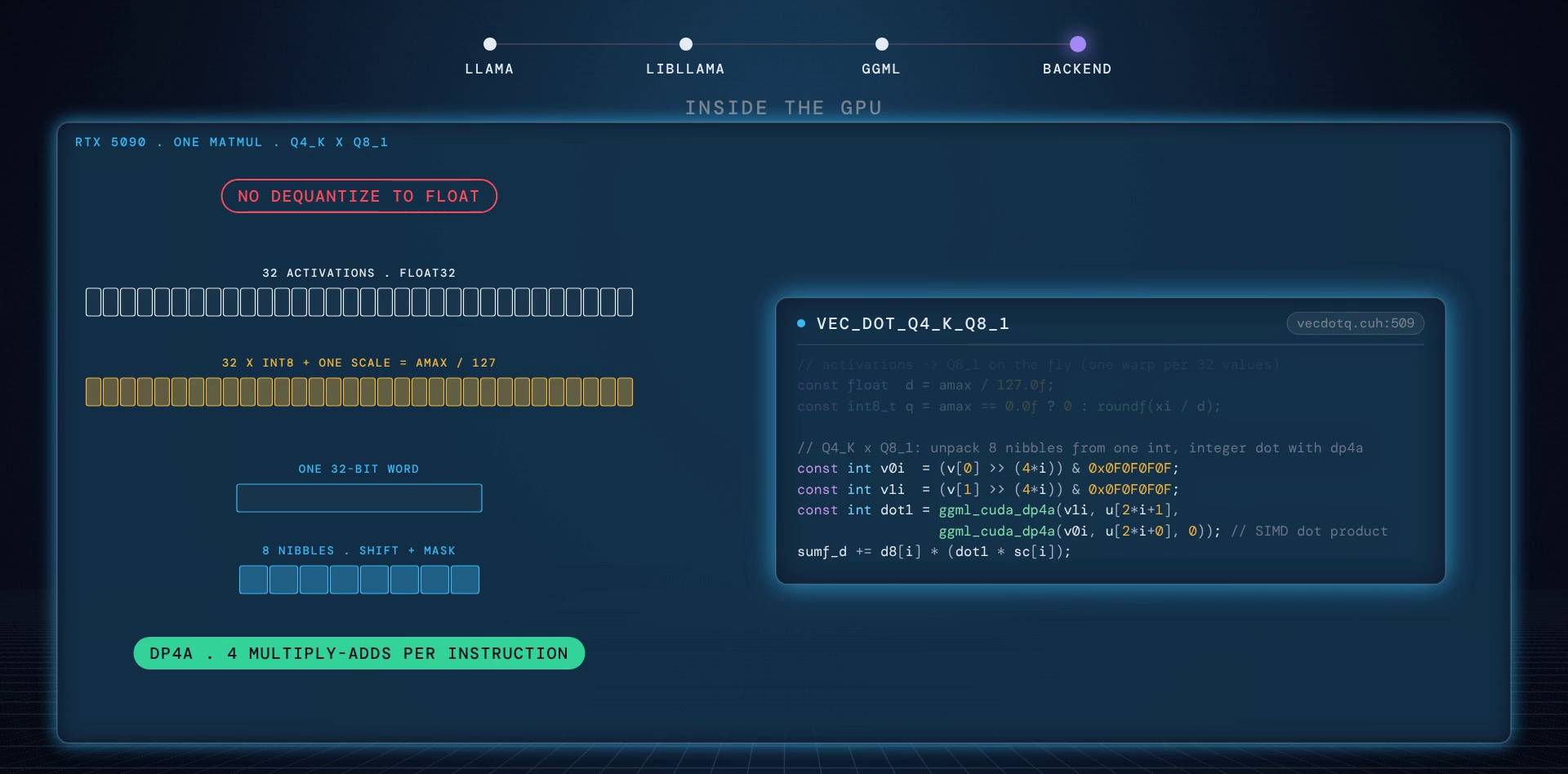
Go deeperwhy the activation sum matters
The Q8_1 block stores not just the 32 integers and their scale but also their sum. That lets the kernel apply the Q4_K "minimum" term to a whole group with a single multiply instead of once per weight. (The matrix-vector kernel above gets the same group sum with one extra dp4a, dot2, and also spends just one multiply per group on the minimum.) On the CPU the same idea runs with AVX2 maddubs / madd or ARM vdot instructions against Q8_K blocks.
Step 9: decode, one token per step
The first token is sampled and we enter decode. One step looks like this:
- The new token's embedding row crosses PCIe (20 KB).
- The graph runs again with one row instead of 58.
- In every attention layer, the new key and value are written into the KV cache with a scatter operation called
set_rows, into the cell the ring buffer handed out. Attention then reads all the cells so far. The DeltaNet layers update their fixed state instead. - At the output, 248,320 logits (about 1 MB) are copied back into pinned host memory.
- The sampler chain runs on the CPU: penalties, top-k, top-p, min-p, temperature, then one random draw.
- The token id becomes text, the text becomes one server-sent event, and your terminal prints a word.
src/llama-kv-cache.cpp:1353 + src/llama-context.cpp:2322
ggml_tensor * llama_kv_cache::cpy_k(ggml_context * ctx, ggml_tensor * k_cur, ggml_tensor * k_idxs, int32_t il, const slot_info & sinfo) const {
    // ...
    // store the current K values into the cache
    return ggml_set_rows(ctx, k, k_cur, k_idxs);
}

// [src/llama-context.cpp:2322]
// try to use the host buffer of the device where the output tensor is allocated for faster transfer to system memory
auto * output_dev = model.dev_output();
auto * output_dev_host_buft = output_dev ? ggml_backend_dev_host_buffer_type(output_dev) : nullptr;
if (output_dev_host_buft) {
    buft = output_dev_host_buft;
}
buf_output.reset(ggml_backend_buft_alloc_buffer(buft, new_size));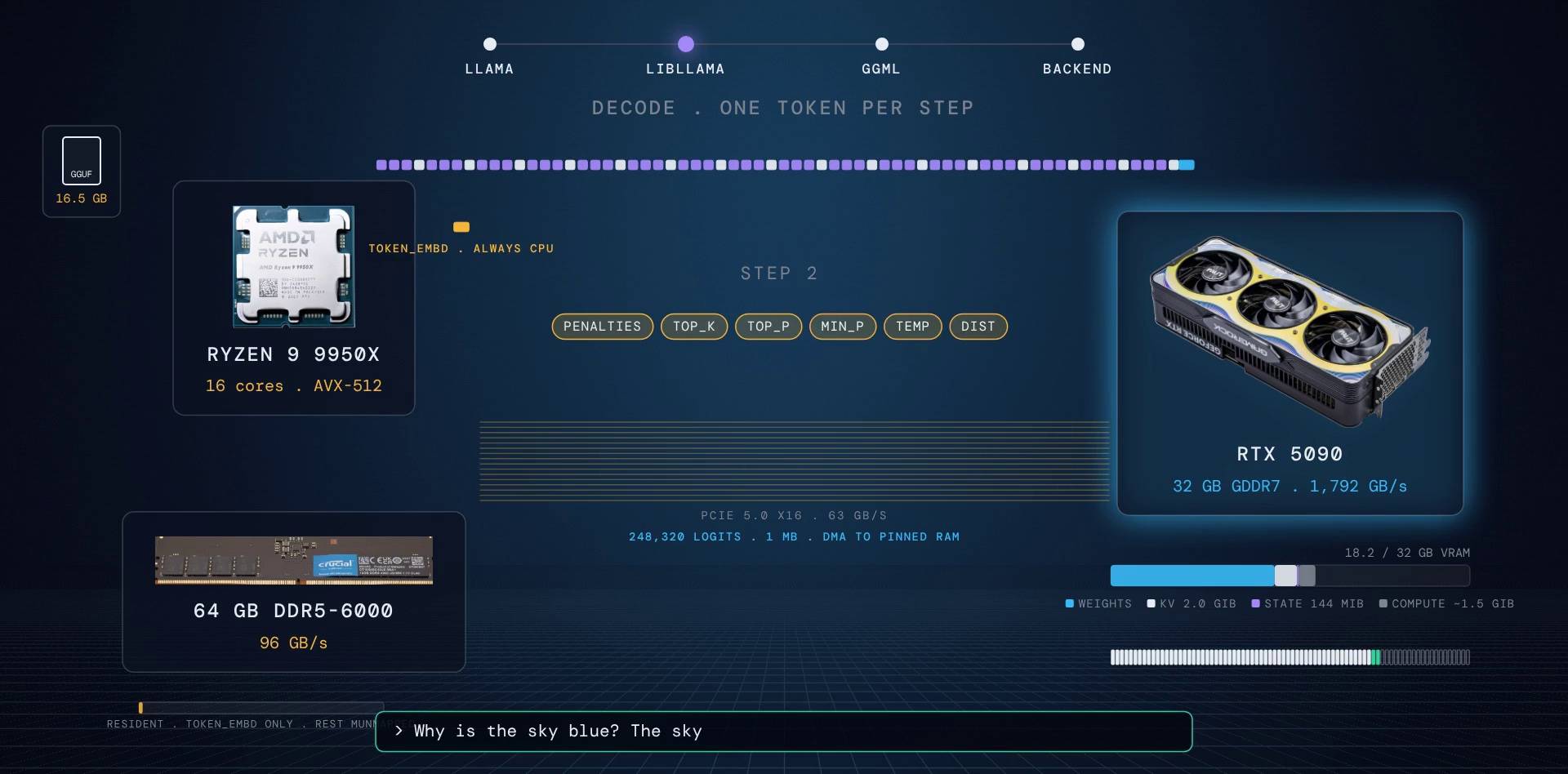
Go deeperUTF-8, top-k, grammars, GPU sampling
- The detokenizer holds back output while the last bytes are an incomplete UTF-8 character, so you never see half an emoji.
- Top-k uses a bucket sort over the vocabulary instead of a full sort.
- Grammar-constrained sampling (JSON schemas, GBNF) samples first, checks just that one token against the grammar, and only resamples on rejection.
- The sampler chain can also run on the GPU ("backend sampling") so only the chosen token comes back instead of a megabyte of logits.
The speed limit: one division
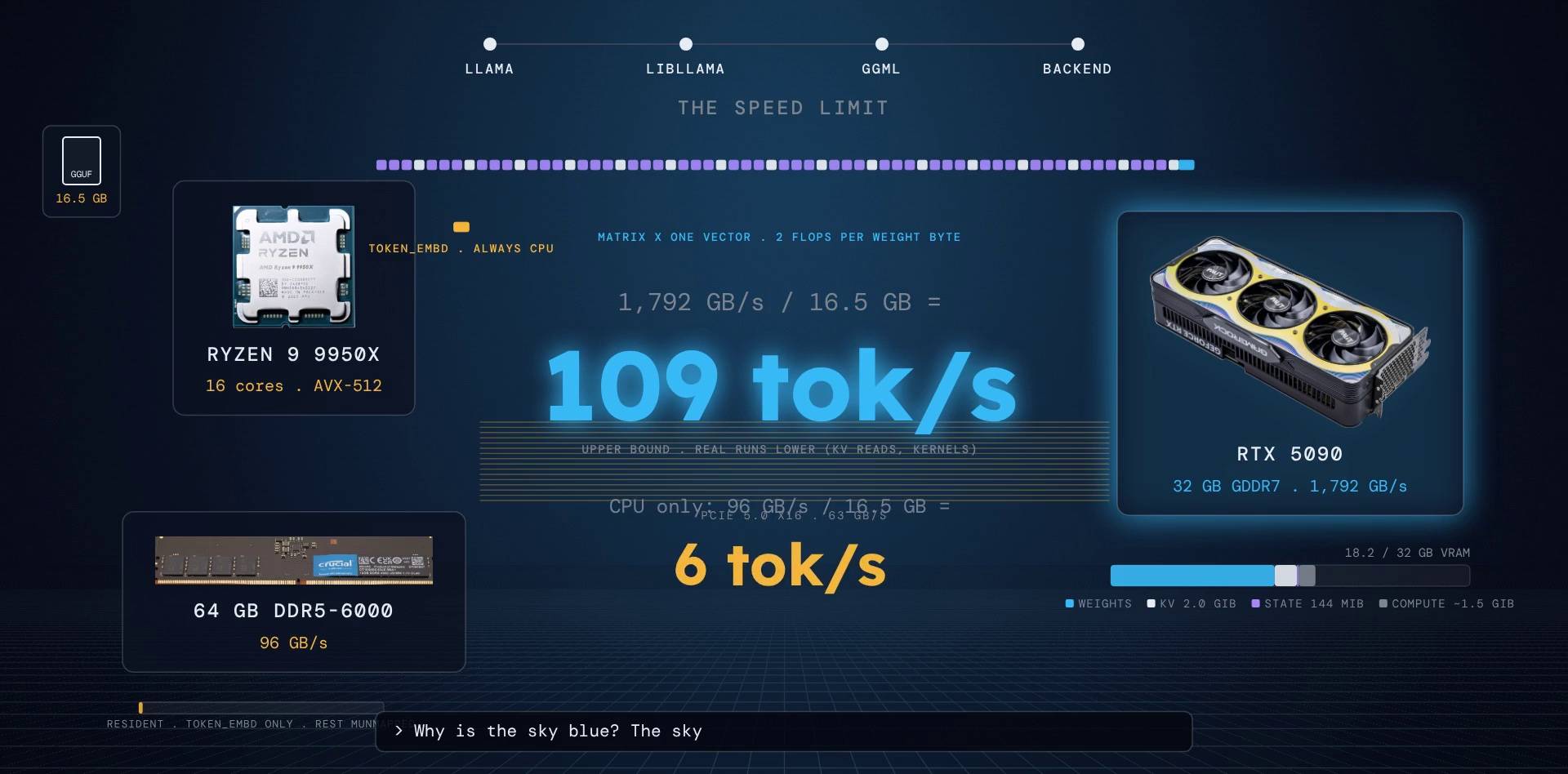
In decode, every matrix multiply is a matrix times one vector. Each weight byte is read from VRAM once and used for exactly two operations. The math units are mostly idle; the limit is memory bandwidth.
So the ceiling is simple:
tokens per second <= memory bandwidth / bytes read per token
- RTX 5090: 1,792 GB/s / 16.5 GB = about 109 tokens per second
- CPU alone, DDR5-6000: 96 GB/s / 16.5 GB = about 6 tokens per second
Same model, same bytes, nineteen times less bandwidth. Real runs are lower than the ceiling, because the KV cache is read too and kernels are not perfect. This is also why the CUDA backend switches kernels: for a batch of 8 or fewer tokens it uses MMVQ, a matrix-vector kernel tuned to stream weights, not to tile them.
// calculator upper bound
What is the speed limit?
Memory bandwidth divided by the bytes read for every token.
at most, as an upper bound
Real runs are lower: the KV cache is read too, and kernels never reach the full bandwidth.
Two tricks that avoid repeating work
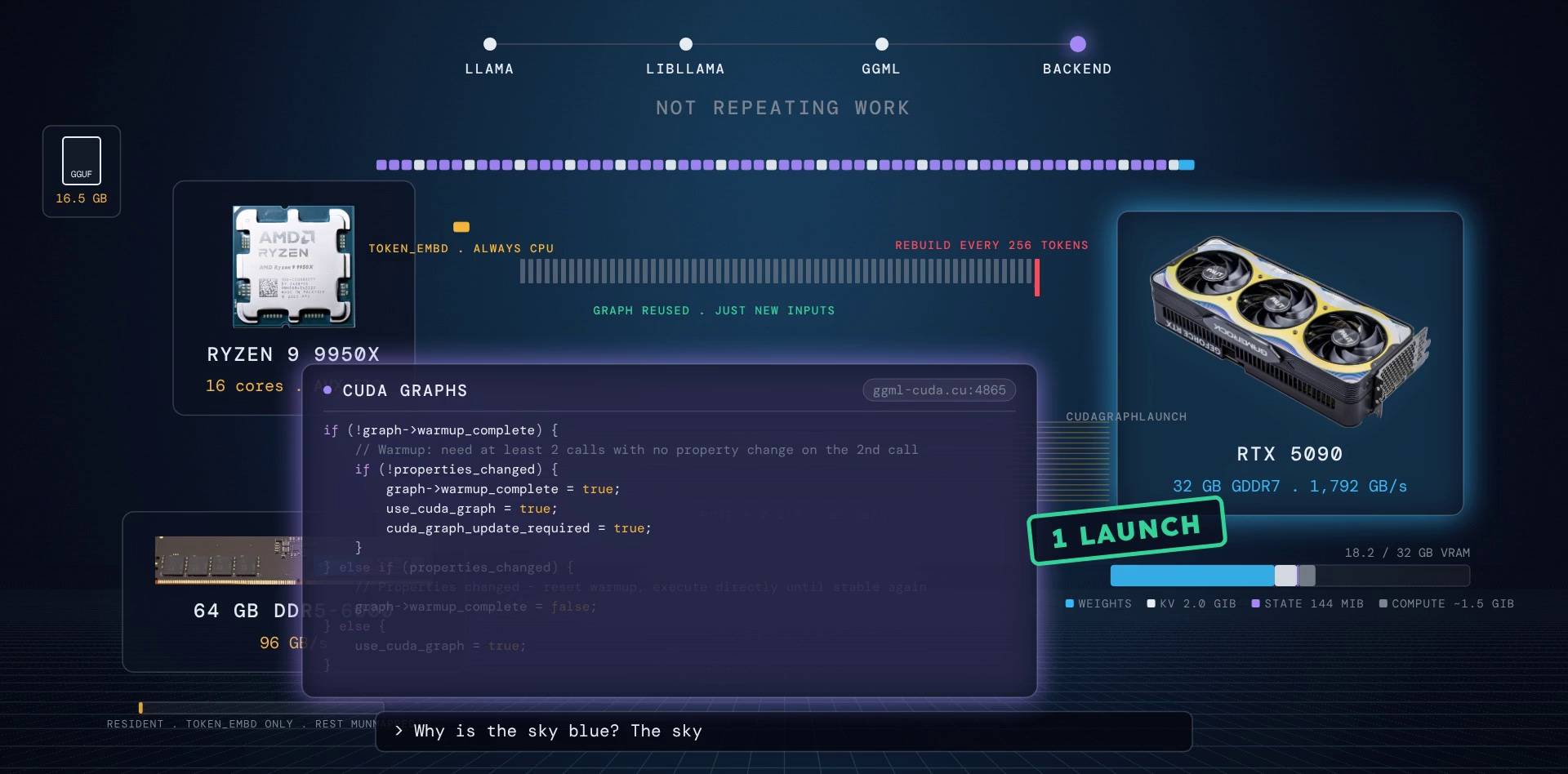
- Graph reuse. Building and scheduling a graph with thousands of nodes costs time, so libllama keeps the last graph and, if the shapes match, only re-sets the inputs. To keep shapes matching, the attention window is padded to a multiple of 256, so the graph is rebuilt once every 256 tokens, not every token.
- CUDA graphs. A decode step launches around two thousand tiny kernels. The CUDA backend watches for two identical calls in a row, records the whole sequence once with stream capture, and from then on replays it with a single launch. Any shape change (like crossing a 256-token boundary) resets the warm-up.
ggml/src/ggml-cuda/ggml-cuda.cu:4865
if (!graph->warmup_complete) {
    // Warmup: need at least 2 calls with no property change on the 2nd call
    if (!properties_changed) {
        graph->warmup_complete = true;
        // ...
        use_cuda_graph = true;
        cuda_graph_update_required = true;
    }
    // else: properties changed or first call - execute directly (use_cuda_graph stays false)
} else {
    // Post-warmup: normal CUDA graph operation
    if (properties_changed) {
        // Properties changed - reset warmup, execute directly until stable again
        graph->warmup_complete = false;
        // ...
    } else {
        use_cuda_graph = true;
        cuda_graph_update_required = graph->instances.empty();
    }
}
When the model does not fit
Say you have a 16 GB card and run with -ngl 40. Then the first 25 layers stay in RAM and run on the CPU backend (16 cores, AVX-512), fed by DDR5 at 96 GB/s. The head and the last 39 layers go to the GPU.
The scheduler now makes three splits: CPU layers, then one activation vector crosses PCIe (20 KB), then the GPU layers. The hop is cheap. The CPU layers are not. Your speed is set by how many bytes the CPU has to read.
And when the context finally fills up, with --ctx-shift on, llama.cpp does not recompute anything. It drops the oldest cells, patches the positions, and rotates the cached keys back in place. RoPE (the position encoding) is a rotation, so rotating back is free.
tools/server/server-context.cpp:3691 + src/llama-kv-cache.cpp:1988
int       n_discard = slot.task->params.n_discard ? slot.task->params.n_discard : (n_left / 2);
// ...
slot.mem.seq_rm (slot.id, n_keep            , n_keep + n_discard);
slot.mem.seq_add(slot.id, n_keep + n_discard, slot.prompt.tokens.pos_next(), -n_discard);

// [src/llama-kv-cache.cpp:1988]
// we rotate only the first n_rot dimensions
tmp = ggml_rope_ext_inplace(ctx, cur,
        shift, factors, n_rot, rope_type, n_ctx_orig, freq_base, freq_scale,
        yarn_ext_factor, yarn_attn_factor, yarn_beta_fast, yarn_beta_slow);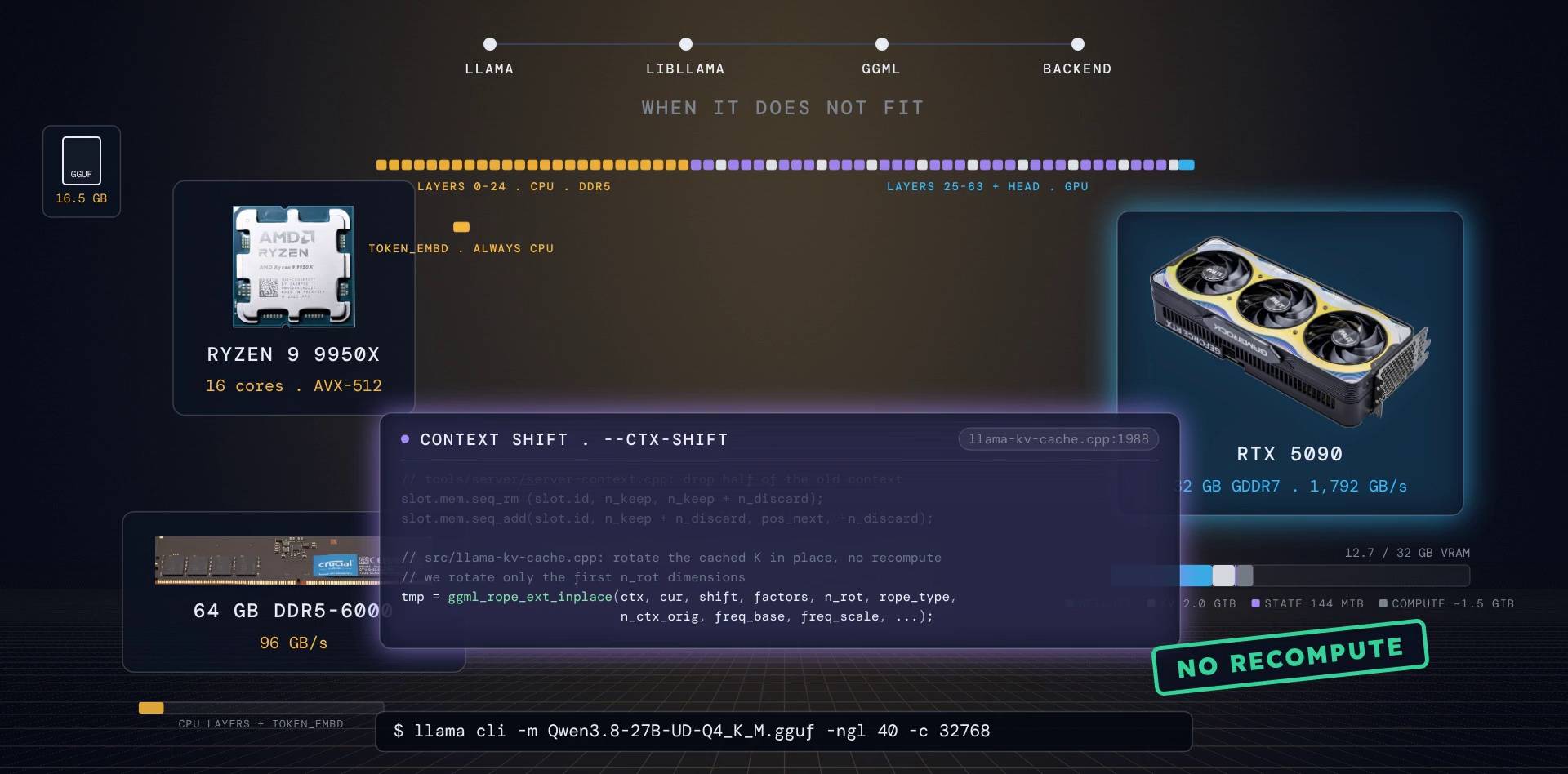
The deep dive: libllama, ggml and the backends
libllama: a plain C API with an exception wall
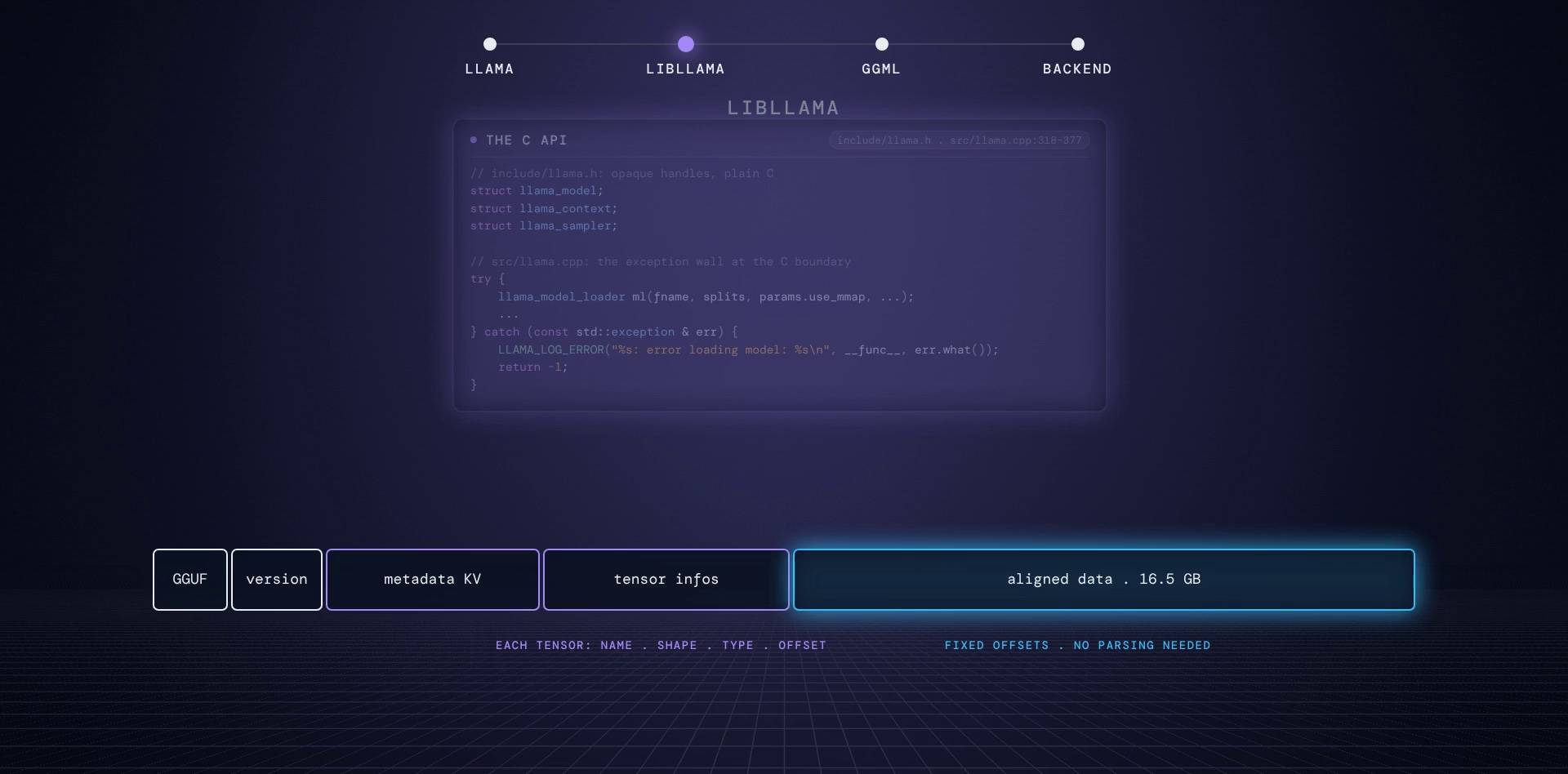
libllama exposes a plain C API, llama.h, with opaque structs: llama_model, llama_context, llama_sampler. You never see their fields. Every function catches C++ exceptions at the boundary and turns them into a return code, so the library can be called from Python, Go or Rust without a C++ runtime in the way.
include/llama.h:62 + src/llama.cpp:318
struct llama_model;
struct llama_context;
struct llama_sampler;

// [src/llama.cpp:318]
try {
    llama_model_loader ml(metadata, set_tensor_data, set_tensor_data_ud, fname, splits, file, params.load_mode,
        params.check_tensors, params.no_alloc, params.load_mtp, params.kv_overrides, params.tensor_buft_overrides);
    // ...
} catch (const std::exception & err) {
    LLAMA_LOG_ERROR("%s: error loading model: %s\n", __func__, err.what());
    return {-1, nullptr};
}
Its input, GGUF, is four magic bytes, a version, a list of key-value metadata, a list of tensor descriptions (name, shape, type, offset), and then one big aligned data section. Every weight sits at a fixed offset. That one design decision is what made the memory map trick possible.
Go deeperhow GGUF stores shapes
GGUF stores tensor shapes reversed (innermost dimension first, like ggml), and the loader rejects a file whose data section is not dense: every tensor's offset must equal the running size of the ones before it.
ggml idea 1: the tensor
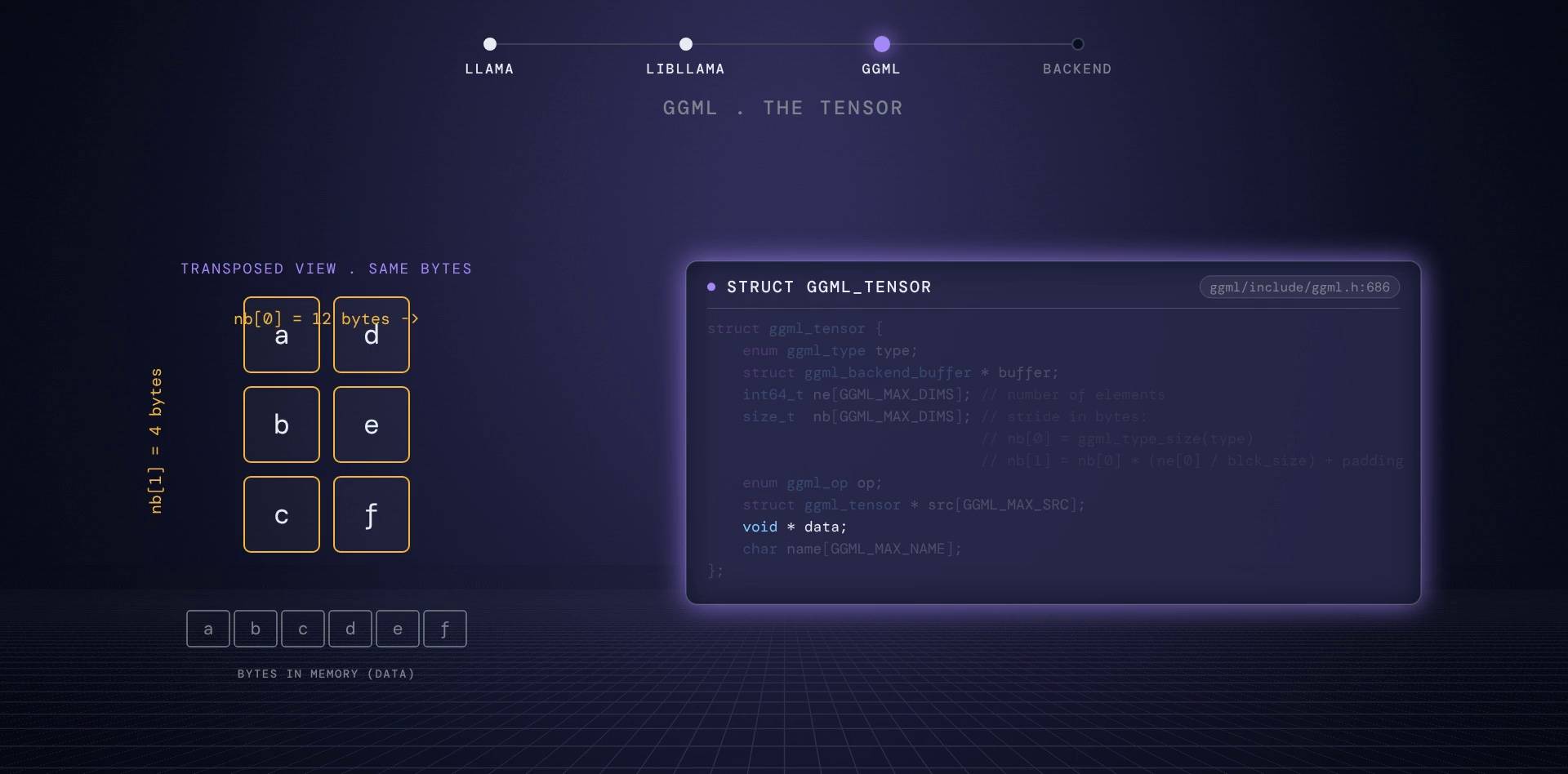
A ggml tensor is a struct with the element counts in ne[] and the byte strides in nb[]. The data pointer is separate. So a transpose, a permute or a view does not copy anything: it creates a new struct with different strides over the same bytes. For a quantized type, nb[0] is the size of one block, which is how 144-byte Q4_K blocks live inside an ordinary tensor.
struct ggml_tensor {
    enum ggml_type type;

    struct ggml_backend_buffer * buffer;

    int64_t ne[GGML_MAX_DIMS]; // number of elements
    size_t  nb[GGML_MAX_DIMS]; // stride in bytes:
                               // nb[0] = ggml_type_size(type)
                               // nb[1] = nb[0]   * (ne[0] / ggml_blck_size(type)) + padding
                               // nb[i] = nb[i-1] * ne[i-1]

    // compute data
    enum ggml_op op;
    // ...
    struct ggml_tensor * src[GGML_MAX_SRC];
    // ...
    void * data;

    char name[GGML_MAX_NAME];
    // ...
};
ggml idea 2: the graph
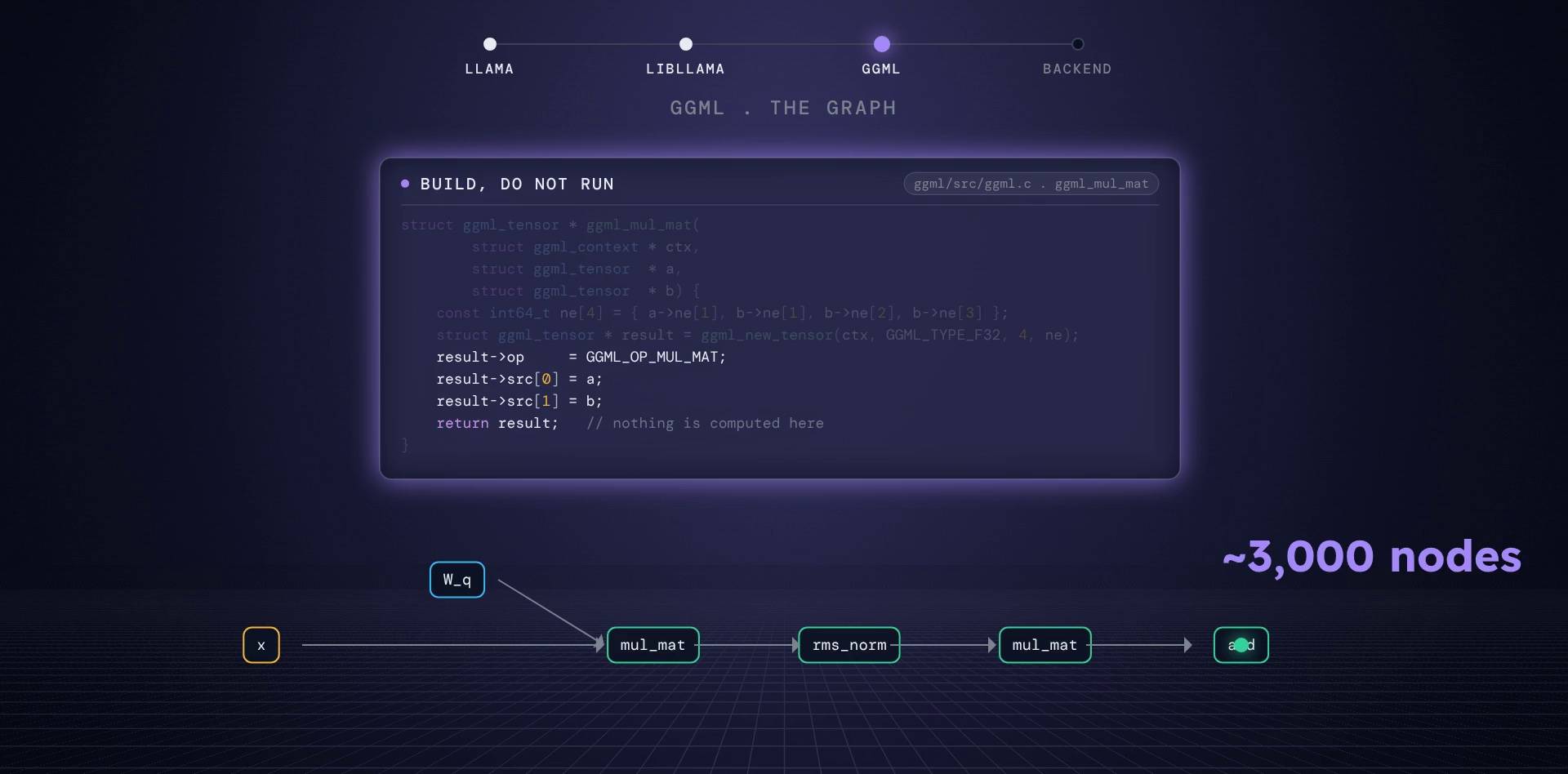
In ggml you do not call matrix multiply; you describe it. ggml_mul_mat returns a new tensor whose op field says MUL_MAT and whose sources point at the inputs. Nothing runs yet. Chaining these calls builds a graph (ggml_cgraph) of every operation in one forward pass; for our 64-layer model that is a few thousand nodes. A separate step walks the graph and executes it. That separation is what lets the same model code run on a CPU, an NVIDIA card or a Mac.
struct ggml_tensor * ggml_mul_mat(
        struct ggml_context * ctx,
        struct ggml_tensor  * a,
        struct ggml_tensor  * b) {
    GGML_ASSERT(ggml_can_mul_mat(a, b));
    GGML_ASSERT(!ggml_is_transposed(a));

    const int64_t ne[4] = { a->ne[1], b->ne[1], b->ne[2], b->ne[3] };
    struct ggml_tensor * result = ggml_new_tensor(ctx, GGML_TYPE_F32, 4, ne);

    result->op     = GGML_OP_MUL_MAT;
    result->src[0] = a;
    result->src[1] = b;

    return result;
}
The bottom layer: backends are shared libraries that vote
A backend is a C struct of function pointers: allocate a buffer, copy a tensor in, compute a graph, synchronize. The CUDA backend fills it with CUDA calls, the CPU backend with a thread pool.
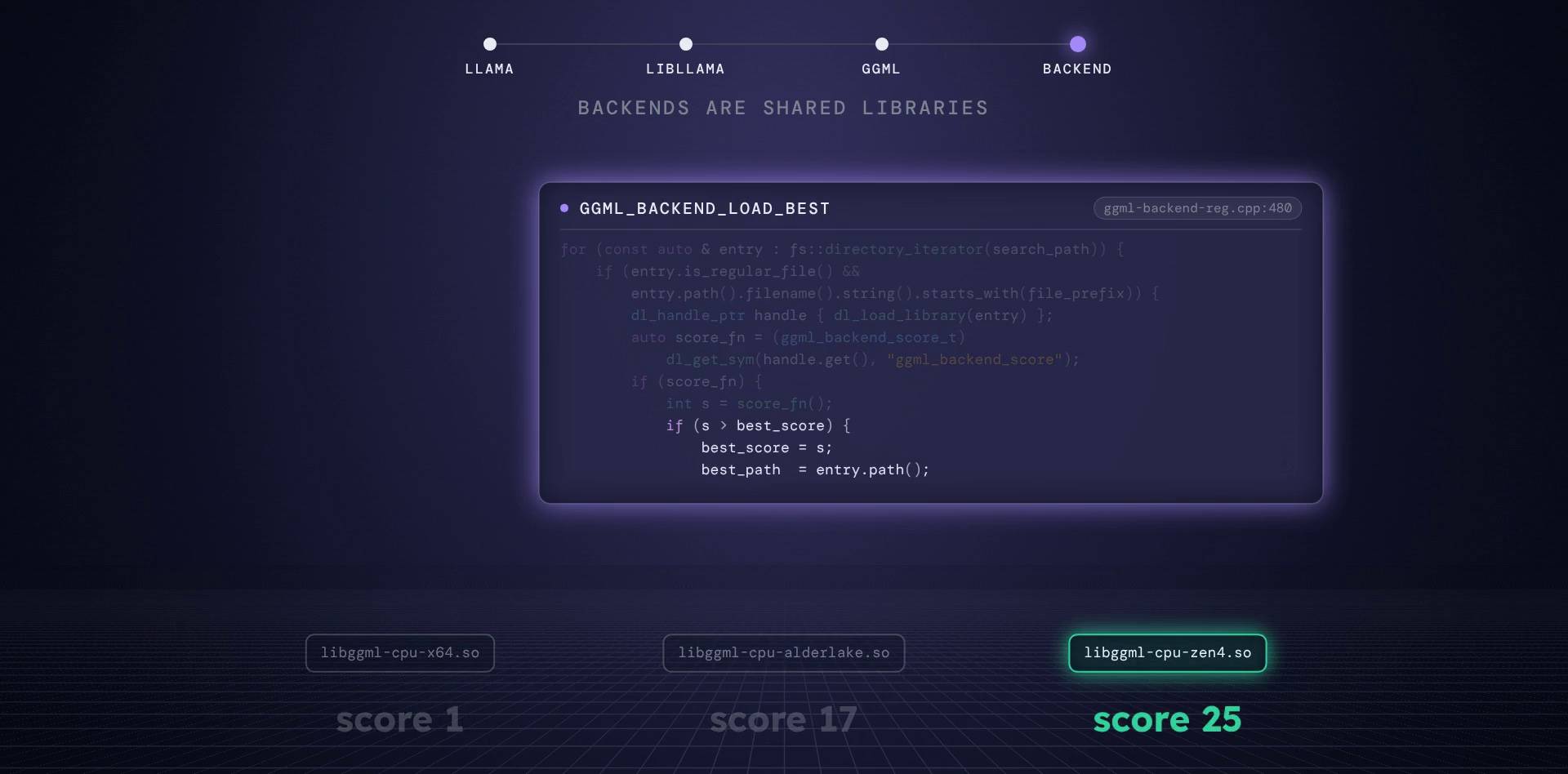
The lesser-known part: backends are shared libraries. At startup ggml scans for every file named like libggml-cpu-*.so, loads each one, calls a function named ggml_backend_score, and keeps the highest score. That is how one download of llama.cpp runs well on a machine with AVX-512 and on one without it.
ggml/src/ggml-backend-reg.cpp:508
for (const auto & search_path : search_paths) {
    std::error_code dir_ec;
    fs::directory_iterator dir_it(search_path, dir_ec);

    for (const fs::directory_iterator end; dir_it != end; dir_it.increment(dir_ec)) {
        const auto & entry = *dir_it;
        if (entry.is_regular_file(ec)) {
            auto filename = entry.path().filename();
            auto ext = entry.path().extension();
            if (filename.native().find(file_prefix) == 0 && ext == file_extension) {
                dl_handle_ptr handle { dl_load_library(entry) };
                // ...
                    auto score_fn = (ggml_backend_score_t) dl_get_sym(handle.get(), "ggml_backend_score");
                    if (score_fn) {
                        int s = score_fn();
                        // ...
                        if (s > best_score) {
                            best_score = s;
                            best_path = entry.path();
                        }
                    // ...
Go deepermore C and C++ tricks
More C and C++ tricks in the codebase:
- When a
GGML_ASSERTfails, ggml forks a child process that attachesgdbto the parent and prints a source-level backtrace before aborting. - One header,
ggml-common.h, is compiled as C, C++, CUDA, Metal, HIP and SYCL through macros, so the block structs are byte-identical on every backend. - ggml has 102 operations and 43 tensor types.
- The graph allocator reuses an input's memory for an op's output when the op allows it and nobody else needs that input.
- The CPU backend's thread pool synchronises with a spin barrier and a generation counter instead of a mutex.
Back to the question: where do the 16 GB go?
They are memory mapped from the file, copied once into a single VRAM buffer, stored as 144-byte blocks of 256 four-bit weights, and read in full, every token, by integer kernels at 1.8 TB/s. The KV cache grows beside them at 64 KiB per token. The embedding table stays in RAM and crosses PCIe every step.
And every component did one job:
- llama: an HTTP client to its own server
- libllama: the file, the tokenizer, the cache, the graph
- ggml: tensors and graphs
- the backend: the only code that touches the hardware
What we skipped
The mixture-of-experts expert cache, speculative decoding with Qwen3.8's MTP head (--spec-type draft-mtp), multi-GPU pipelines, server slots with continuous batching, and the Metal and Vulkan backends. Each one deserves its own post.
Frequently asked questions
What is llama.cpp?
An open source engine, written in C and C++ by Georgi Gerganov in March 2023, that runs large language models on your own machine: CPUs, NVIDIA and AMD GPUs, Apple chips and more. It created the GGUF file format and is the engine inside Ollama, LM Studio, Jan and GPT4All.
Why does llama.cpp memory map the model file?
mmap makes the GGUF file appear as a range of memory without copying it. Tensors that stay on the CPU are used straight from the kernel's page cache, the whole file streams from the SSD in order, and a second launch is fast because the file is already cached.
What does Q4_K_M mean?
Q4_K stores 256 weights in a 144-byte super-block: 4-bit values, a 6-bit scale and minimum for each group of 32, and two 16-bit block scales. That is 4.5 bits per weight. The M (medium) mix keeps the output head and part of the attention value and FFN down weights at Q6_K. Dynamic quants such as unsloth UD-Q4_K_M choose a type per tensor: the Qwen3.8-27B file in this post averages 4.82 bits per weight.
How much memory does the KV cache need?
Per token: 2 (K and V) x attention layers x KV heads x head dim x bytes per element. Qwen3.8-27B has 16 full-attention layers with 4 KV heads of 256 dims, so in f16 it needs 64 KiB per token: 2 GiB at 32K tokens and 8 GiB at 128K.
How fast can llama.cpp generate tokens on an RTX 5090?
Decode is limited by memory bandwidth, so the ceiling is bandwidth divided by the bytes read per token. A 16.5 GB model on an RTX 5090 (1,792 GB/s) tops out near 109 tokens per second; on dual-channel DDR5-6000 (96 GB/s) near 6. Real runs are lower.
What does -ngl do in llama.cpp?
-ngl sets the number of layers to put on the GPU, counted from the output end. -ngl 99 sends every layer and the output head to the GPU. The token embedding table always stays in system RAM, because offloading the input layer brings very little benefit.
Sources
- llama.cpp source, ggml-org/llama.cpp at commit 06230cb (2026-10-23), MIT license: GitHub
- Qwen3.8-27B model card and config: Hugging Face
- unsloth GGUF builds and download counts: Hugging Face
- Changelog podcast #532 with Georgi Gerganov: changelog.com
- ggml.ai joins Hugging Face (discussion #19759): GitHub
- RTX 5090 specs: NVIDIA and Wikipedia
- Ryzen 9 9950X specs: AMD
- DDR5 and PCIe bandwidth: DDR5 SDRAM and PCI Express on Wikipedia
Credits
- Code excerpts: ggml-org/llama.cpp at commit 06230cb (2026-10-23), MIT License, Copyright (c) 2023-2026 The ggml authors. Excerpts are shortened;
// ...marks skipped lines and// [path:line]marks where an excerpt continues in another file. - AMD Ryzen 9 9950X photo by 4300streetcar, CC BY 4.0, via Wikimedia Commons ("AMD Ryzen 9 9950X 2.jpg"), background removed.
- DDR5 UDIMM photo by Smial, Free Art License 1.3, via Wikimedia Commons ("DDR5 SDRAM IMGP6295 smial wp.jpg"), cropped.
- Palit GeForce RTX 5090 GameRock photo by PantheraLeo1359531, CC BY 4.0, via Wikimedia Commons, background removed.
- Georgi Gerganov photo: BSides Sofia 2023.
- Diagrams and video frames: CloudMash.